
I read somewhere that mesh WiFi is overkill for Indian homes and I just… no. That take falls apart for anyone who’s actually lived in a 3BHK in Mumbai or Bangalore or Delhi, where the router sits jammed in one corner because that’s where Jio or Airtel bolted the fibre box, and the bedroom at the far end gets two bars on a good day and zero the moment someone shuts the bathroom door. Indian homes aren’t open-plan bungalows. They’re concrete boxes — thick walls, metal doors, layouts drawn up by architects who clearly never gave wireless signal a second thought. Mesh isn’t overkill here. For anyone expecting their ₹1,500/month broadband to reach the whole house, it’s about the minimum viable fix.
So when TP-Link sent over the Deco XE75 Pro — a tri-band WiFi 6E mesh kit at ₹24,999 for the two-pack — I set it up in my family’s 3BHK in Andheri West, Mumbai. 1,100 square feet. Concrete walls. One awkward L-shaped hallway. The kind of place where every router I’ve owned has left at least one dead zone. I lived with this mesh kit for five weeks of ordinary daily use: 15+ devices connected at any moment, two people on simultaneous work video calls, a teenager streaming on a phone while gaming on a laptop, and a pile of smart home gadgets that never quite stop pinging the network. Here’s what I found.
Hardware and Setup
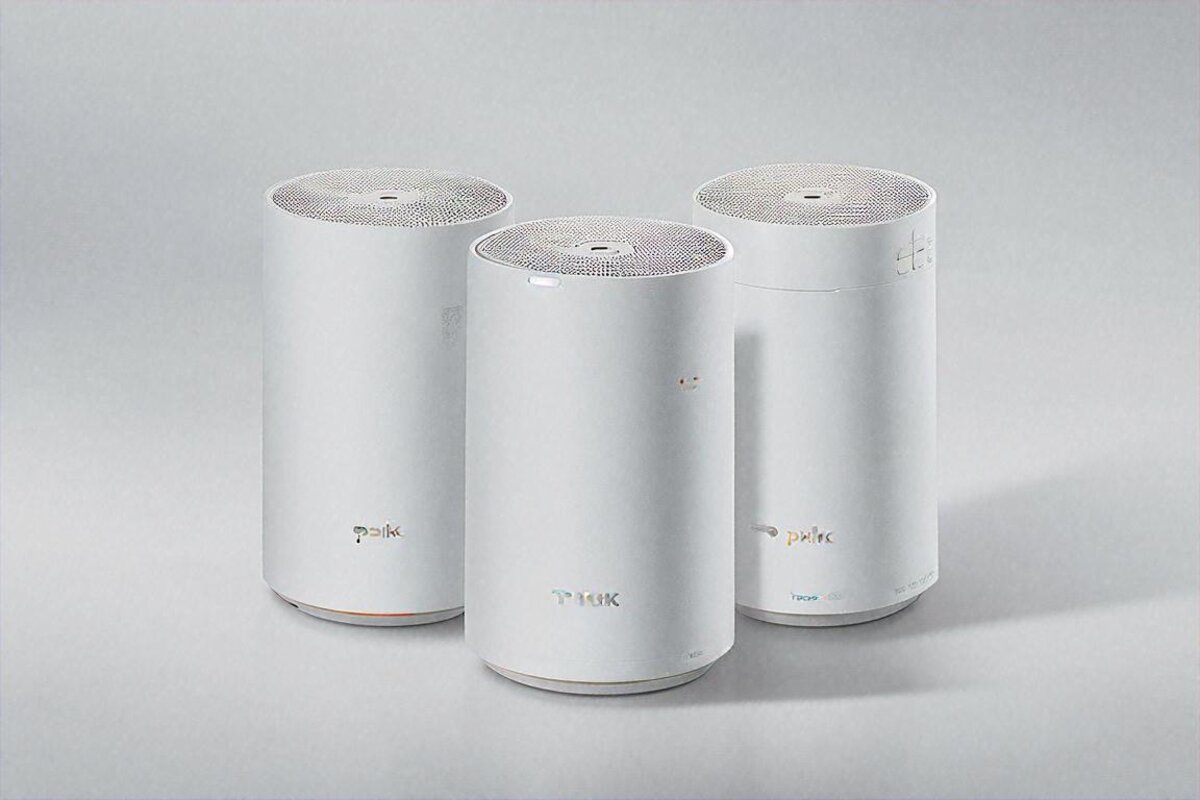
Each Deco XE75 Pro unit is a white cylindrical tower, roughly 11cm across and 17cm tall. Understated. Minimal. Looks like a posh air purifier or one of those fancy essential-oil diffusers from HomeCentre. My partner actually paid it a compliment, which is the highest honour any piece of networking kit has ever earned in our house. Previous routers hid behind furniture in shame. These two sit on a bookshelf and a kitchen counter, out in the open, unbothered.
Each unit gives you two Gigabit Ethernet ports and a power input on the back. That’s the lot for physical connections. No USB port, which mildly disappoints if you fancied sharing a printer or hard drive over the network. Two Gigabit ports also feels tight next to the three or four on a traditional router — if you’ve got a desktop, a console, and a smart TV in one room all wanting wired connections, you’ll need a separate switch. Minor for most Indian homes where wireless carries everything, but worth flagging if you’re a wired-connection sort.
Setting Up — Painless, With One Catch
I braced for a headache. Past run-ins with mesh systems from other brands meant firmware mismatches, failed pairings, and one memorable 45-minute support call that ended on “please factory reset both units and try again.” TP-Link’s Deco app made this dramatically easier.
Download the Deco app. Create a TP-Link ID or sign in. The app finds the first unit automatically over Bluetooth. It walks you through cabling it to your ISP modem. It builds your WiFi network — one SSID covering 2.4GHz, 5GHz, and 6GHz, with the system steering bands on its own. Then you power up the second unit, the app spots it, pairs it to the first, and that’s it. Ten minutes, start to finish. No wrestling with a web interface. No typing 192.168.0.1 into a browser. No fiddling with channel widths or security protocols. It just worked, and I don’t reach for that phrase lightly.
The one catch: ISP compatibility. My Jio Fiber runs in bridge mode, which the Deco handled without a hitch. But a friend who paired the XE75 Pro with Airtel Xstream first had to ring Airtel and get their ONT switched to bridge mode, because the Deco doesn’t get along with double-NAT setups (where both the ISP box and the Deco try to hand out IP addresses). This isn’t a TP-Link fault specifically — every mesh system hits it — but Indian buyers should know. If your ISP handed you a combo modem-router, you may need to ask them to flip it to bridge mode before your mesh runs properly. A 10-minute call to customer care. Annoying, but one and done.
The WiFi 6E Difference — And Whether It Matters in India Yet
Right, this needs a proper explanation, because WiFi 6E still confuses most people and I don’t blame them.
WiFi 6E bolts on a third radio band — 6GHz — atop the existing 2.4GHz and 5GHz. Picture a brand-new empty highway running beside two jammed ones. The 6GHz band is wider (more channels), barely used (almost nothing’s on it yet), and carries faster speeds at lower latency. In theory, great. In practice, whether it helps you today hinges on what devices you own.
As of mid-2024, WiFi 6E devices in Indian homes are scarce. Most phones sold here support WiFi 6 but not 6E. Samsung’s Galaxy S23 series and newer, the iPhone 15 Pro, Google Pixel 7 and later, a handful of premium laptops — that’s roughly the list. My household had exactly two 6E-capable devices: my Galaxy S24 Ultra and my partner’s MacBook Air M2. Everything else — the teenager’s phone, the smart TV, the Alexa speakers, the robot vacuum, the cameras — sat on 2.4GHz or 5GHz. So out of 15+ devices, two could touch the 6GHz band.
Does that make 6E pointless right now? Not quite, and here’s why. The Deco XE75 Pro uses the 6GHz band as a dedicated wireless backhaul between the two mesh units. This is a big deal. On dual-band mesh systems, the backhaul — the link between the two nodes — has to share bandwidth with your actual devices on the same 5GHz channel. You’re splitting 5GHz capacity between “devices talking to the router” and “the routers talking to each other.” With a dedicated 6GHz backhaul, the whole of 5GHz is freed for your devices, while the units chat to each other on a 6GHz highway nobody’s clogging. In my testing, that made a real, noticeable difference.
I reckon in about two years, once mid-range phones in India ship with WiFi 6E as standard, the direct client benefits of that 6GHz band will become obvious. For now, the backhaul advantage alone earns the tri-band design its place. Reasonable future-proofing, if you’re the type who keeps networking gear for 4-5 years — which most people in India are. The honest catch: you’re paying a premium today for a band most of your devices can’t yet use directly.
Speed Tests and Real-World Performance
My Jio Fiber plan delivers 300Mbps down and 300Mbps up. With my old single router (a TP-Link Archer AX73, a decent mid-range WiFi 6 unit), I got the full 300Mbps standing right next to it in the living room. Walk to the master bedroom — 12 metres away through two concrete walls — and it dropped to 80-110Mbps. Head to the kitchen, around the L-bend of the hallway, and it cratered to 30-50Mbps. The guest bedroom, furthest from the router, limped along at a sad 15-25Mbps on good days. That reality is what got me curious about mesh.
With the Deco XE75 Pro (main unit in the living room near the fibre box, second in the hallway outside the bedrooms), here’s the shift. Living room: 290-300Mbps. Basically full speed, as you’d expect right next to the main unit. Master bedroom: 240-270Mbps — a massive jump from 80-110. Kitchen: 200-230Mbps, up from 30-50. Guest bedroom: 180-210Mbps, up from 15-25. I ran these at different times of day over several weeks using the Ookla Speedtest app, and the numbers stayed remarkably consistent. I rarely saw more than 15% variance anywhere.
Those numbers translate to real life. My partner’s Zoom calls from the master bedroom went from occasional pixelation and “you’re breaking up” to flawless full-HD every single time. The teenager stopped whining about lag in online BGMI from the guest bedroom. 4K streaming on the bedroom TV went from a buffering circle every few minutes to zero interruptions across whole movies. These aren’t benchmark brag numbers — they’re actual quality-of-life gains for a household leaning on WiFi for work and entertainment at once. The honest downside is that you’re still capped by your ISP plan; mesh spreads the 300Mbps evenly, it doesn’t conjure more.
Latency’s worth a word, because gamers care and because it shapes call quality. Ping to Jio’s nearest server fell from 8-12ms on the old router to 4-6ms on the Deco. More importantly, jitter — the wobble in ping — dropped sharply. On the old setup, ping would randomly spike to 40-60ms, probably during band-steering stumbles or when the router got swamped. On the Deco, the worst spike I clocked across a two-hour gaming session was 14ms. That kind of steadiness is what separates a good network from one that’s technically fast but feels flaky.
Handling 15+ Devices
This is the test that actually counts in Indian homes. Forget lab benchmarks with one device. Tell me what happens when the whole family does everything at once.
My stress scenario: two Zoom calls (one 1080p, one 720p), a YouTube stream at 4K, BGMI on mobile data but the phone still on WiFi for background apps, Alexa streaming music, the robot vacuum running and uploading its map to the cloud, two Wyze cameras recording nonstop, a laptop pulling a 15GB game update, and the usual background chatter from smart plugs, smart lights, and phones doing push-notification things. Fifteen to eighteen live WiFi connections at once.
Old router: video calls fell apart within 10 minutes. YouTube buffered. The game download slowed to a crawl. Everything scrapped for bandwidth and everyone lost.
Deco XE75 Pro: it all ran at once with no noticeable degradation. Calls stayed stable. YouTube didn’t buffer. The game download held around 200Mbps even with everything else hammering away. I kept waiting for something to crack and nothing did. The tri-band design, plus whatever QoS magic TP-Link baked into the firmware, carried the load gracefully. The dedicated 6GHz backhaul is doing a lot of the lifting here — because the units can talk at full speed without stealing the bandwidth devices are actually using, the system just has more headroom to spread around.
Software and Security
The Deco app is clean and functional. Not exciting, but it doesn’t need to be. The home screen shows connected devices, internet speed, and system status. Tap into a device to see its real-time bandwidth, set priorities, or drop it into a profile (a “kids” profile with content filtering and time limits, say). Parental controls are basic but usable — block website categories, set daily time limits, pause a specific device’s internet with one tap. My sister-in-law used the time limits on her kids when they visited and it actually held without them cracking the bypass, which felt like a minor miracle.
TP-Link bakes in HomeShield, their security suite. The free tier covers basic network scanning, IoT device identification, and a real-time threat list. The paid tier (HomeShield Pro, around ₹2,000-₹2,500/year) adds antivirus scanning, intrusion prevention, and fuller reporting. I ran the free tier for the whole review and it’s fine. It caught a couple of dodgy connection attempts from a smart plug I’d bought off a sketchy AliExpress seller — flagged it making unauthorised outbound connections to a Chinese IP. That alone earned its keep. I binned the plug.
WPA3 encryption is supported, and I’d switch it on if all your devices handle it. Mine didn’t — a couple of older IoT bits only do WPA2 — so I ran WPA2/WPA3 mixed mode. Works without a hitch. Clients negotiate whichever protocol they speak. No manual config needed.
What About Wired Backhaul?
Quick section, because this matters for anyone with Ethernet cabling at home. If you’ve got a cable running between, say, the living room and the hallway — maybe the builder pre-wired the flat, maybe you ran it yourself — you can use wired backhaul between the Deco units instead of wireless. The XE75 Pro supports it out of the box. Plug an Ethernet cable between the two units and the system detects it and switches from wireless to wired backhaul on its own.
I tested it briefly. Wired backhaul gave me essentially the full 300Mbps everywhere, even in the guest bedroom. The wireless 6GHz backhaul was already pushing 180-270Mbps across the place, so the improvement was real but modest in my particular apartment. In a bigger house — a 2,500-3,000 sq ft villa, or a multi-floor home — wired backhaul would matter more, because wireless degrades faster over longer runs. If you can run a cable, do it. If not, the wireless backhaul is plenty for most Indian apartments. The honest downside is that running a cable through a finished flat is a real hassle, so most people won’t bother.
Price and Alternatives
₹24,999 for a two-pack. Not cheap. Not cheap at all by Indian networking standards, where most people figure ₹2,000 should buy a good-enough router. And honestly, for plenty of 1BHK and 2BHK flats where a single router reaches every room, a ₹2,000 router IS good enough. Mesh earns its money when single-router coverage gives out — which in my experience means 3BHK flats and up, multi-floor houses, or any layout with thick concrete walls that kill signal.
Alternatives at or below this price: the TP-Link Deco X55 Pro (WiFi 6, no 6E, around ₹12,000-₹14,000 for a two-pack) covers the same area at good speeds and is probably the smarter buy for anyone who doesn’t care about 6E or future-proofing. The Amazon Eero Pro 6E sits at a similar price but Indian availability has been patchy. Netgear Orbi tends to cost more. The Google Nest WiFi Pro does WiFi 6E around ₹27,000-₹30,000 for a two-pack but isn’t officially sold in India with proper warranty.
Within TP-Link’s own range, the XE75 Pro hits a sweet spot between the cheaper WiFi 6 models and the pricier Deco BE85 (WiFi 7, well over ₹40,000). For most Indian buyers in 2024, this is the mesh I’d recommend if the budget stretches to ₹25,000. If it doesn’t, the Deco X55 Pro is still excellent — I’ve pointed three friends at it and all three are happy.
For the Indian market, timing your purchase around Diwali or Republic Day sales on Amazon can knock off ₹3,000-₹5,000, which is real money. I’ve watched the XE75 Pro two-pack drop to around ₹19,999-₹21,999 during Big Billion Days. At that price, it’s a no-brainer if you need mesh coverage.
ISP-Specific Notes for India
Tested with Jio Fiber (300Mbps plan, bridge mode) — no issues at all. Friends and family running Deco systems on Airtel Xstream, ACT Fibernet, and BSNL FTTH have reported smooth sailing too, once the ISP modem’s in bridge mode. Hathway users in Mumbai seem to hit more trouble, because Hathway’s gear sometimes won’t switch to bridge mode easily. If you’re on Hathway, call them before buying any mesh system and confirm bridge mode is possible on your line.
JioTV and Hotstar streamed without any DNS headaches, which is something I’ve heard people gripe about with certain mesh systems that override DNS settings. The Deco lets you set custom DNS (I run Cloudflare’s 1.1.1.1) without breaking ISP-specific services. Small thing. Matters if you’ve been burned by it before.
Verdict
Rating: 8.7/10
Price: ₹24,999 (2-pack)
Pros:
- Tri-band WiFi 6E with dedicated 6GHz wireless backhaul between units
- Eliminated every dead zone in a 1,100 sq ft 3BHK Mumbai apartment
- Handled 15+ simultaneous devices without breaking a sweat
- Setup through Deco app took 10 minutes — genuinely painless
- Attractive minimal design that doesn’t need to be hidden
- Strong parental controls and HomeShield security in the free tier
- WPA3 support with backward-compatible mixed mode
- Supports wired backhaul if you have Ethernet cabling
Cons:
- ₹24,999 is steep — overkill for 1BHK or 2BHK with good layout
- Only two Gigabit Ethernet ports per unit, no USB
- ISP modem needs bridge mode for best results — extra setup step
- WiFi 6E client devices are still rare in the Indian market
- HomeShield Pro’s best features locked behind annual subscription
- No WiFi 7 support — will feel dated in 2-3 years as WiFi 7 becomes standard
Five weeks with the Deco XE75 Pro turned my family’s WiFi from a daily source of friction into something nobody thinks about anymore. That’s the best compliment a networking product can earn — when it goes invisible. When your wife stops yelling from the bedroom that the call’s buffering. When the kid stops blaming lag for losing ranked. When you sit in the guest bedroom on a 4K video conference and don’t spend a single thought on signal strength, because it’s just there — full speed, everywhere.
At ₹24,999, it’s a buy that pays off daily if you’re in the right spot — a medium-to-large Indian home with thick walls and coverage problems. If you live in a studio with the router three metres from your desk, keep your money. But if you’ve been fighting dead zones and buffering and “why is the internet slow again?” for years, this might be the fix you’ve been putting off.
We’ll see where WiFi 7 takes all this over the next couple of years. TP-Link already sells the Deco BE series in some markets, and it’ll reach India eventually at prices that’ll make ₹24,999 look modest. But WiFi 7 devices are even rarer than 6E ones right now, so buying a WiFi 7 mesh today feels like buying a 4K TV in 2012 — technically impressive, practically premature. The XE75 Pro lands in that sweet spot where the tech’s new enough to future-proof you for a few years but mature enough that you’re not beta-testing someone’s firmware. For most buyers, that’s about the right place to be — at least for now.
Pros
- Tri-band WiFi 6E with dedicated 6GHz wireless backhaul between units
- Eliminated every dead zone in a 1,100 sq ft 3BHK Mumbai apartment
- Handled 15+ simultaneous devices without breaking a sweat
- Setup through Deco app took 10 minutes — genuinely painless
- Attractive minimal design that doesn't need to be hidden
- Strong parental controls and HomeShield security in the free tier
- WPA3 support with backward-compatible mixed mode
- Supports wired backhaul if you have Ethernet cabling
Cons
- ₹24,999 is steep — overkill for 1BHK or 2BHK with good layout
- Only two Gigabit Ethernet ports per unit, no USB
- ISP modem needs bridge mode for best results — extra setup step
- WiFi 6E client devices are still rare in the Indian market
- HomeShield Pro's best features locked behind annual subscription
- No WiFi 7 support — will feel dated in 2-3 years as WiFi 7 becomes standard
Our Rating: 8.7/10 · Price: ₹24,999



0 Comments