
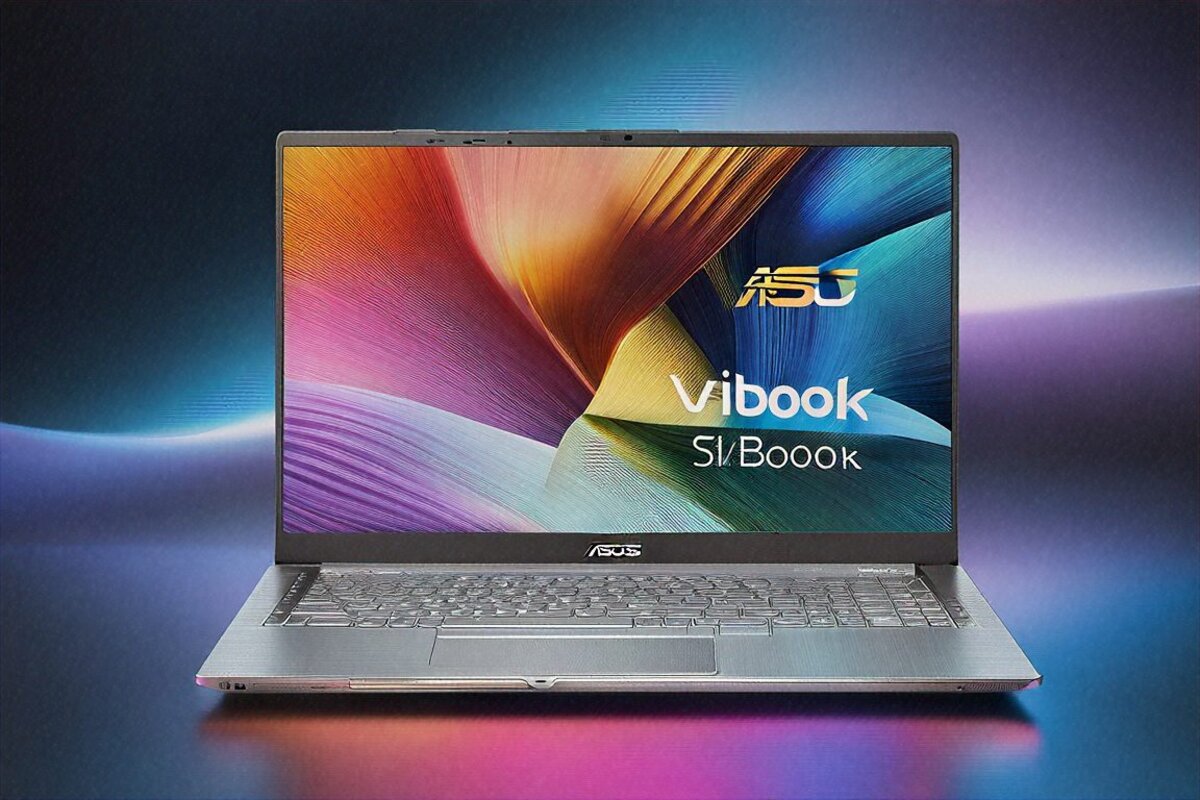
₹89,999 for a 3.2K OLED Display — There Has to Be a Catch, Right?
This whole thing started with a favour. A friend at IIT-D asked me to point him at a laptop under a lakh. Good screen for lectures and movies, enough grunt for coding and the odd Python script, battery to survive a day of classes, light enough to sling across campus. Nothing exotic.
I started rattling off the usual names — Lenovo IdeaPad, HP Pavilion, maybe a Vivobook. Then I actually pulled up the specs and price on the ASUS Vivobook S 16 OLED. A 16-inch 3200×2000 OLED panel at 120Hz, an AMD Ryzen 9 8945H, 16GB of LPDDR5X, a 512GB SSD — all for ₹89,999. That OLED panel on its own usually pushes a laptop past ₹1,20,000. So either ASUS had quietly cut a corner I hadn’t spotted, or this was the value pick of the year.
Six weeks of daily use later, I know where the corners are. And I know why, for most people shopping at this price, they don’t really matter.
What’s Inside
An AMD Ryzen 9 8945H — 8 cores, 16 threads, 55W TDP. Integrated Radeon 890M graphics, no discrete GPU. 16GB of LPDDR5X, partly soldered but with a path to 32GB. A 512GB PCIe Gen 4 SSD, plus a second M.2 slot sitting empty and waiting. That 16-inch OLED at 3200×2000, 120Hz, 600 nits peak. A 75Wh battery. And ASUS’s StoryCube software for sorting your photos and videos with on-device AI.
Windows 11 Home. 1.8 kilograms. 1.7cm at its thickest.
The Display — Let’s Talk About Why This Laptop Exists
You buy this laptop for the screen. Everything else is competent. The screen is the thing.
3200×2000 on a 16-inch OLED works out to about 234 pixels per inch. At a normal distance you can’t pick out a pixel. Text is sharp in a way you don’t fully clock until you go sit in front of a stock 1080p IPS panel and flinch at the fuzz. Web pages, documents, code — all of it reads cleaner.
Because it’s OLED, the blacks are true blacks. Pixel-off blacks. Run a dark theme in VS Code at night and the dark parts of the screen put out no light at all, so your eyes don’t fry as fast. The contrast between text and background is, in the literal math, infinite. Side by side with my friend’s IPS machine (a perfectly fine ₹65,000 HP Pavilion), the gap was obvious to both of us in about two seconds. He ordered a Vivobook S 16 that same evening.
The 16:10 ratio at 3200×2000 hands you more vertical room than the usual 1920×1080 16:9 setup, and that matters more than people expect. In VS Code you see more lines. Reading a document, you scroll less. Web pages show more at once. For a student living in IDEs and browsers, that extra height adds up to real time saved across a semester.
120Hz makes scrolling smooth — not in a showy way, more in a quiet “everything just feels more responsive” way. You notice it most dragging through long docs or pages. Then it becomes your normal, and 60Hz starts to look choppy.
Colour at 100% DCI-P3 with Pantone Validation means design or photography students can do colour-sensitive work right on this panel, no external monitor required. That’s a genuine perk at ₹90K, where most rivals give you sRGB coverage and leave it there.
The 600-nit peak brightness handles indoors fine. Classroom, library, cafe, bedroom — no visibility trouble. Out in direct sun it struggles, but so does every OLED panel ever made. The anti-glare coating at least takes the edge off overhead lighting.
Build Quality — Here’s Where the Cuts Show
The aluminium lid feels premium under your hand — cool, smooth, solid. Open it up and the keyboard deck carries that same decent-quality feel. Then flip it over: plastic bottom panel. Not nasty plastic, but clearly a different thing from the aluminium up top in both feel and stiffness.
This is the ₹90K compromise, plain as day. ASUS spent the money where you can see and touch it — the lid, the keyboard area — and saved it on the underside that lives against your desk. For most people that’s a non-issue, since you never look at the bottom in normal use. For the type who picks a laptop up and inspects it from every angle, it’s a small reminder you didn’t drop ₹1.5 lakh.
At 1.8kg and 1.7cm thin, the shape is nice. Not ultrabook-skinny, but slim enough to slide into a backpack without bulking it out. The hinge swings smoothly and locks at any angle, no wobble while you type. It comes in Mist Green and Neutral Black, both tasteful, neither showing off. Mine was Neutral Black, which looks professional enough for an interview and casual enough for a cafe.
One niggle: the screen wobbles a little if you hammer the keys on an uneven surface. The hinge is tuned for smooth motion over outright rigidity. On a flat desk it’s fine. On your lap in a moving train, you’ll see a bit of bounce. Small thing, but worth flagging.
Keyboard and Trackpad
The keyboard’s backlit with decent travel, somewhere around 1.4-1.5mm by my reckoning. Nothing special, nothing bad. Comfortable across a long typing stretch, with standard key spacing for a 16-inch machine. My one gripe is the arrow keys, shrunk down so you can’t reliably hit them without glancing at the deck. It’s a common cost-saving layout, and it irritates me every single time.
The trackpad is big, glass-topped, and responsive. Windows Precision drivers do their thing properly — multi-finger gestures, smooth scroll, tap to click. Better than I expected at the price. Not MacBook-refined (nothing is), but good enough that I didn’t reach for a mouse for the first fortnight.
Performance — Ryzen 9 Does the Heavy Lifting
The Ryzen 9 8945H and its 8 cores, 16 threads is more chip than most students or productivity users will ever max out. My test load: Chrome with 25 tabs, VS Code holding a Python project, Spotify going, Slack running, and a Jupyter notebook crunching data in the background. All smooth. No lag flipping between apps, no stutter on video calls, and the battery didn’t crater despite all of it running at once.
For programming specifically — compiling, spinning up light Docker containers (not a full microservices stack), running pandas and NumPy scripts — the Ryzen 9 chews through it briskly. A medium C++ project built about 40% faster than on a previous-gen Ryzen 7 machine I had to hand.
Video playback and streaming are flawless. 4K YouTube, Netflix in HDR (and the OLED makes HDR genuinely sing), Disney+ Hotstar — all smooth. As a college entertainment machine, it’s tough to beat at any price.
So where do you hit a wall? Gaming and heavy creative work. The Radeon 890M handles light gaming — Valorant at medium clears 60 fps, older titles run fine at medium-high, GTA V at medium sits around 45-50. But anything demanding — Cyberpunk, modern AAA at high, the heavier indie games — falls below playable. This isn’t a gaming laptop and never claims to be.
Lightroom Classic runs but drags during heavy brush edits. Premiere Pro copes with basic 1080p but chokes on 4K timelines and effects-heavy projects. Photoshop’s fine for web design and photo retouching. Keep your creative work in the “moderate” lane and it works. Step up to serious video editing or 3D rendering and you need a discrete GPU.
Battery Life — Gets Through the Day
The 75Wh battery gave me 8-10 hours on my test load: mixed browsing, doc editing, coding, and the odd video. For a 16-inch OLED machine, that’s genuinely good. The OLED’s knack for switching pixels off when displaying black actually helps here — dark-themed apps literally sip less power on OLED.
I ran a fake college day to check: three hours of morning lectures (notes in OneNote, a bit of browsing), two hours of afternoon coding, a lunch hour with Netflix, then two evening hours in Chrome and PDFs. Finished around 18% battery, without plugging in once. For a student, that’s the line between hauling a charger every day and leaving it back in the hostel.
ASUS’s 65W USB-C charger is small and light. Fast charging gets you to 60% in roughly 45 minutes. Any USB-C PD charger works as a backup, which is handy — odds are a friend has one you can borrow if you’re stuck.
Storage — Start Small, Upgrade Later
512GB as a starting point is tight in 2026. Windows 11 and the pre-loaded apps swallow 40-50GB. Games run 50-100GB a pop. Photo and video libraries balloon. After my usual apps and a couple of games, I was at 60% capacity inside two weeks.
But — and this is the part that matters — there’s an empty second M.2 slot inside. Drop in a 1TB or 2TB SSD for ₹4,000-8,000 and you double or triple your storage without touching the original drive. That’s a thoughtful call from ASUS, and it takes most of the sting out of the small base. If you plan to keep games or big media files local, I’d budget for that second SSD right at purchase.
The 512GB PCIe Gen 4 drive that’s in there is quick — sequential reads around 5,000 MB/s, cold boot under 10 seconds, snappy app launches. For the money, the SSD performance fits.
Connectivity
One Thunderbolt 4 port. A USB-C port with 65W charging. Two USB-A 3.2 ports. HDMI 2.1 out. A full-size SD card slot. A combo audio jack. Wi-Fi 6E and Bluetooth 5.4.
Decent enough spread. The single Thunderbolt 4 port caps how much high-speed gear you can chain, but for a student who occasionally hooks up a monitor and a USB stick, it’s plenty. The full SD slot is a welcome touch that pricier laptops sometimes drop. And HDMI 2.1 means a 4K monitor at 120Hz with no dongle — useful if you’ve got a good display waiting at home.
ASUS StoryCube AI
ASUS throws in StoryCube, its AI photo and video organiser. It sorts your media on-device, builds smart albums, and suggests edits. I fed it around 2,000 photos and… it’s okay. The categorising landed maybe 70% of the time — it nailed scenery, food, people, and pets, but tripped over some group shots and the low-light stuff. As a free extra it’s a nice gesture. As a stand-in for Google Photos’ AI sorting, it’s not quite there.
Full Specifications
| Specification | Details |
|---|---|
| Processor | AMD Ryzen 9 8945H, 8 cores / 16 threads, 55W TDP |
| GPU | AMD Radeon 890M (integrated) |
| RAM | 16GB LPDDR5X (upgradeable to 32GB) |
| Storage | 512GB PCIe Gen 4 SSD + empty M.2 slot |
| Display | 16″ OLED, 3200×2000, 120Hz, 600 nits, Pantone Validated |
| Battery | 75Wh (8-10 hours mixed use) |
| Weight | 1.8 kg |
| Ports | Thunderbolt 4, USB-C (65W PD), 2x USB-A, HDMI 2.1, SD card, 3.5mm |
| Wireless | Wi-Fi 6E, Bluetooth 5.4 |
| OS | Windows 11 Home |
Pros
- 3.2K OLED 120Hz display at this price is genuinely remarkable value
- Ryzen 9 delivers strong productivity and coding performance
- 8-10 hour battery gets through a full college day
- Empty second M.2 slot allows cheap storage expansion
- Slim 1.7cm profile and 1.8kg weight suit daily carry
- 100% DCI-P3 with Pantone Validation for colour-accurate work
Cons
- No discrete GPU — serious gaming and heavy creative work not possible
- Plastic bottom cover doesn’t match the aluminium top’s premium feel
- 512GB base storage fills up quickly
- RAM partially soldered — upgrade path exists but is limited
- Integrated Radeon 890M caps gaming at casual titles only
Compared to the Obvious Alternatives
At ₹89,999, the rivals make for an interesting field. The Lenovo IdeaPad Pro 5i at roughly the same money brings a 2.8K IPS panel (good, but not OLED), an Intel Core Ultra 7, and similar RAM and storage. Better keyboard, you could argue. Worse display, no argument. If OLED doesn’t move you, it’s a solid pick. Once you’ve seen the two screens together, you’ll take the Vivobook.
The HP Pavilion Plus 16 sits at ₹80-85K with an IPS panel and comparable specs. Five to ten thousand cheaper, sure, but that display downgrade is steep. The gap’s small enough that the OLED jump is worth the extra.
Stretch to ₹1,10,000-1,20,000 and you’re into gaming-laptop turf — an ASUS TUF Gaming or Lenovo IdeaPad Gaming with an RTX 4050 or 4060 and a 1080p IPS panel. If gaming’s the priority, those win. If display quality and productivity come first, the Vivobook S 16 takes it comfortably.
Against the MacBook Air M3 (now down to ₹99,900 in India), you get a bigger, higher-res display and Windows compatibility for ₹10K less. The MacBook wins on build, trackpad, battery, and ecosystem. It’s a real toss-up, riding on which side you’re on with macOS versus Windows and how much the larger screen matters to you.
Do I Recommend It? Honestly, I Think So — But I’m Not 100% Sure
Here’s my hesitation. The Vivobook S 16 OLED has the best display you can get in a sub-₹1-lakh laptop in India, and it’s not close. For students, that screen plus a capable Ryzen 9, decent battery, and a slim build makes it an easy recommendation.
But “easy recommendation” assumes the buyer rates display above everything. A student who games more than studies? Wrong laptop. A freelancer cutting video for clients? You need a discrete GPU. Someone who throws their laptop around and wants it built like a tank? That plastic underside won’t reassure you.
I recommended it to my IIT-D friend and he’s thrilled. He codes, watches lectures, streams films, browses, and edits the odd photo. For that use — which I’d bet covers most students and young professionals — it’s excellent value.
For the edge cases, though? I genuinely don’t know. Is ₹89,999 better spent on a gaming laptop with a mediocre screen? On a MacBook Air with a smaller one? On a ₹60K machine plus an external OLED monitor? Those are all real alternatives depending on what you care about, and I don’t think there’s a single right answer.
What I do know: sit in front of this OLED for an hour and you won’t want to go back to IPS. Whether that feeling is worth ₹89,999 — and whether the rest of the laptop fits your specific needs well enough to earn the display premium — only you can call. I lean yes. But I get anyone who leans the other way.
Price in India
The ASUS Vivobook S 16 OLED runs ₹89,999 in India, on the ASUS India site, Amazon India, Flipkart, and laptop stores across the country. During the big sale windows — Big Billion Days, Great Indian Festival, Republic Day — I’ve watched it slip to ₹80-82K, worth holding out for if you’re not in a hurry. ASUS’s education programme can shave another ₹2-3K off for students too.
Full Specifications
| Processor | AMD Ryzen 9 8945H 8C/16T |
|---|---|
| GPU | AMD Radeon 890M Integrated |
| RAM | 16GB LPDDR5X max 32GB |
| Storage | 512GB PCIe Gen 4 |
| Display | 16" OLED 3200×2000 120Hz |
| Battery | 75Wh 8-10 hours |
| Weight | 1.8 kg |
| OS | Windows 11 Home |
Pros
- 3.2K OLED 120Hz at mainstream price
- Slim 1.7cm profile
- Ryzen 9 productivity performance
- Extra M.2 slot
- StoryCube AI features
Cons
- No discrete GPU
- Partial soldered RAM
- Plastic bottom cover
- 512GB base storage limited
Our Rating: 8.4/10 · Price: ₹89,999
0 Comments