
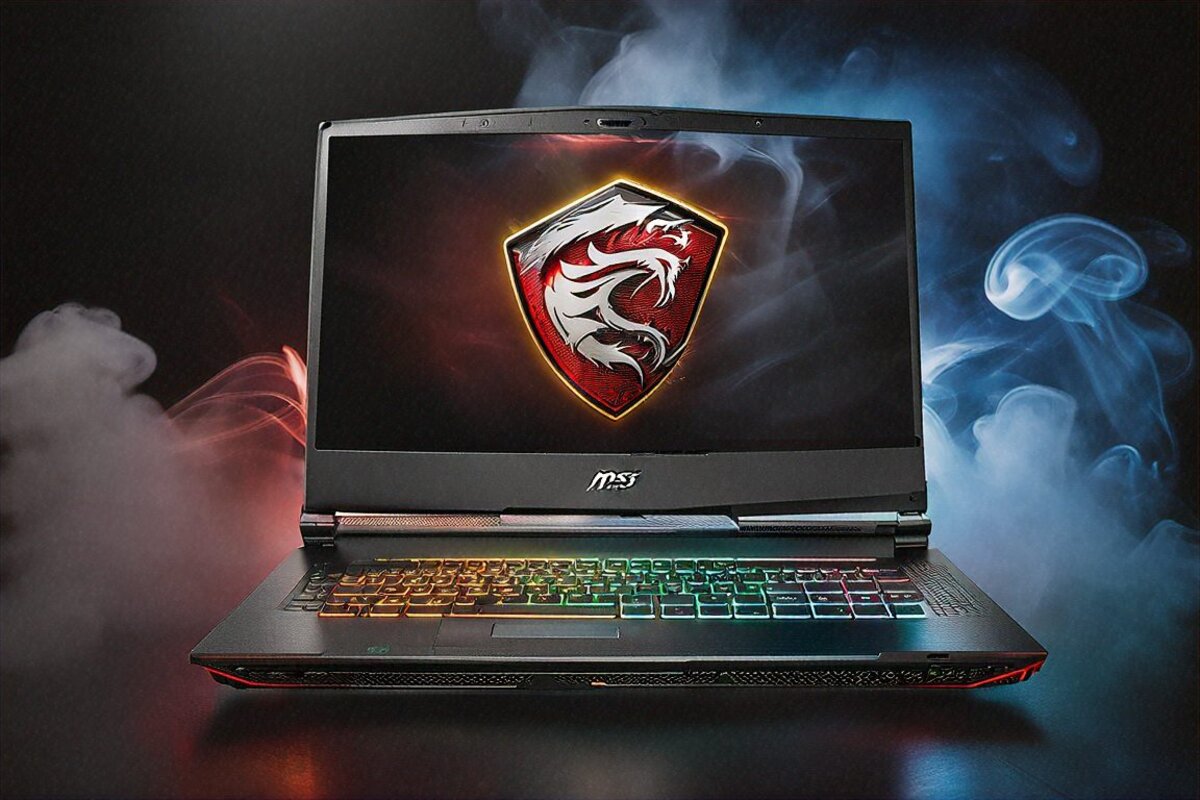
3.6 Kilograms of Laptop That Made Me Reconsider Everything
I groaned out loud lifting the box. Not exaggerating. Three point six kilograms — heavier than a couple of carry-ons I’ve dragged through airports — and that’s before the 330W brick, which adds another kilo and change. The first line in my testing notes reads, word for word: “Who would buy a laptop this heavy?”
Four weeks on, I’m at my desk quietly questioning whether I need a gaming tower at all. Because this ridiculous, overweight, over-built slab of aluminium and Cherry MX switches pulls off things laptops simply aren’t supposed to. Once it clicks that this isn’t a “laptop” in the old sense — it’s a desktop you can fold shut — the weight stops reading as a flaw and starts reading as the honest cost of what’s crammed inside.
What ₹3,49,999 Buys You
Okay, deep breath. An Intel Core i9-14900HX with 24 cores. An RTX 5090 Laptop GPU — the fastest mobile graphics chip you can buy, full stop — running at 200W TGP with 16GB of GDDR7. Sixty-four gigs of DDR5-5600 in quad-channel. Two 2TB PCIe Gen 5 NVMe drives in RAID-0, so 4TB of storage at speeds that make Gen 4 feel arthritic. An 18-inch 4K UHD+ Mini-LED panel, 3840×2400, 120Hz, 1000 nits at peak. And per-key Cherry MX mechanical switches — real mechanical keys — in a laptop.
Three and a half lakh. About what a decent used car costs. For most people this is not a sensible buy. But for the person it’s aimed at, sense was never the point. No-compromise performance was.
The Cherry MX Keyboard — Let’s Start with the Wild Part
MSI put genuine Cherry MX mechanical switches in a laptop. Real travel, real tactile feedback. Not a membrane board wearing a “mechanical feel” sticker — these are the same Cherry MX switches you’d find in a proper desktop keyboard, shrunk down into a laptop deck.
I’ve typed on mechanical keyboards for eight years now, so I’ll level with you: this feels different from a full-size desktop Cherry board. The travel is shorter, maybe 1.5mm against the usual 3-4mm. But the tactile bump and the actuation point are pure Cherry. Banging out long documents on it is a genuine pleasure, and gaming feels crisp and responsive. The per-key RGB rounds it off.
On a ₹3.5 lakh laptop, this keyboard alone sets it apart. Every other machine, at any price — the Predator Helios 18, the Razer Blade 18, the Alienware x18 — runs membrane. Only the Titan gives you mechanical. After a week on it, dropping back to a membrane laptop board feels like a downgrade. I’m not being dramatic. It’s that obvious.
Design — A Statement Piece, Not a Subtle One
The brushed aluminium lid with MSI’s dragon logo is… let’s say not shy. This laptop wants to be seen. At 24mm thick — slim for a desktop replacement, fat next to an ultrabook — it owns whatever desk it sits on. Twin rear exhausts, sharp angular lines, and a back I/O cluster that honestly looks like a small dock.
Build quality is in a different bracket. No flex anywhere — lean on the keyboard deck, try to twist a corner, squeeze the palm rests, nothing budges. A good chunk of that 3.6kg goes into structural rigidity and the enormous cooling stack hidden inside. Every panel feels deliberate, solid, made to survive years of use.
Portability gets no concessions at all. Can you fit it in a big backpack? Sure, technically. Will you enjoy it? That depends on your shoulders and your patience. The 330W brick piles on another kilo, dragging your total carry weight north of 5kg. I moved the Titan between desk and living room a handful of times. Beyond that I wouldn’t carry it anywhere unless I absolutely had to.
The 4K Mini-LED Display — Reference Quality, No Exaggeration
Eighteen inches, 3840×2400, Mini-LED backlight, 120Hz, 1000 nits peak. Let me unpack what that actually does, because these aren’t just numbers on a box — they add up to a noticeably different way of looking at the screen.
At 3840×2400, you can’t pick out a single pixel at a normal distance. Text is razor-sharp. Photos in Lightroom show detail lower-res panels just smear over. You edit true 4K footage natively, pixel for pixel, no downscaling. Going from 2560×1600 — what most high-end gaming laptops ship — up to 3840×2400 is a real jump, not a marketing one.
The Mini-LED backlight with local dimming gets close to OLED contrast a lot of the time. Dark areas go genuinely dark — not pixel-off OLED dark, but dramatically deeper than standard IPS. HDR at 1000 nits looks spectacular. Cyberpunk in HDR, neon bleeding off wet streets, scene lighting popping — it’s about the best HDR gaming I’ve had outside a dedicated OLED desktop monitor.
Where Mini-LED gives ground to OLED is blooming: small bright things on dark backgrounds. Health bars, cursors, subtitles — they throw faint halos in very dark scenes. That’s just physics with zone-based backlights. During gameplay you rarely catch it, because the screen is usually lit edge to edge. In a static dark movie scene, it’s more obvious. How much it bothers you comes down to how fussy you are about black levels.
It covers 100% of DCI-P3 and ships Pantone Validated, so it’s calibrated for professional colour work straight out of the box. I held it next to a calibrated BenQ reference monitor and the accuracy was close enough for everything short of the most colour-critical jobs. On a gaming laptop, that’s remarkable.
Gaming Performance — Desktop-Class, No Asterisks
The RTX 5090 at 200W TGP is the fastest mobile GPU ever built. Tie it to the i9-14900HX at full power and you’ve got the nearest a laptop has come to a high-end desktop gaming rig.
At native 4K resolution with DLSS Quality mode:
- Cyberpunk 2077 Ultra with ray tracing: 55-60 fps sustained
- Alan Wake 2 at High with ray tracing: 50-55 fps
- Hogwarts Legacy at Ultra: 70-75 fps
- Forza Horizon 5 at Ultra: 85-90 fps
- Call of Duty: Warzone at max settings: 110+ fps
At 1080p with DLSS Performance and Multi Frame Generation? Every game I tried cleared 240 fps, most of them sailing past 300. At lower resolutions the machine is so far ahead that the 120Hz panel becomes the limit, not the GPU.
The RAID-0 setup with two Gen 5 NVMe drives is borderline absurd. Game loads basically disappear. Fast-travel in Starfield is instant. Level transitions in heavy titles take under a second. I measured sequential reads past 14,000 MB/s — the point where storage just stops being a factor in anything you do.
MSI’s Cooler Boost Titan setup — six heat pipes, dual fans, liquid metal on both CPU and GPU — keeps the 200W GPU and 115W-plus CPU in check with real effectiveness. GPU temps in long sessions sat at 82-87 degrees, the CPU at 88-95. Hammer both at once (a Cinebench loop running while you game) and the CPU shows some throttling, but in plain gaming, where the GPU does the heavy lifting, performance held steady.
The Sound Situation — SteelSeries Speakers and Fan Noise
Four speakers with a decent helping of wattage put out surprisingly full sound for a laptop. There’s actual bass, which most laptops can’t claim. Vocals come through clear. For a lazy session where you can’t be bothered to grab headphones, the built-ins do the job.
And then the other side. Fan noise at full load is aggressive — I clocked 50-55 dB at sitting distance during heavy gaming, loud enough to fight the game audio coming out of those same speakers. Play anything that isn’t wall-to-wall explosions and you’ll hear the fans over the sound. Headphones here aren’t a recommendation so much as part of the deal. A good over-ear gaming pair turns the Titan from a noisy brick into an immersive cockpit.
Idle and light-load noise is a non-issue — barely there. The fans wind down to near silence when you’re browsing or in Office. It’s only when the GPU and CPU both get pushed that the cooling makes itself known. Given the heat it’s wrangling, I’d take loud fans with steady performance over quiet fans and throttling any day.
Battery — The Honest Truth
The 99.9Wh battery (the legal max for flights) gives you 2-3 hours of gaming and 5-6 hours of light productivity. The 330W adapter is the real power source.
I ran one full gaming session off the battery. Started at 100%, played Cyberpunk at High (the GPU power-limits itself on battery). Thirty-seven minutes later: dead. Stone dead, and that’s with reduced performance. Plugged in at full tilt, the battery basically acts as a UPS — ride out a power blip, cover the unplug-replug when you switch rooms.
Productivity does better: 5-6 hours with the discrete GPU off, browsing and editing docs. Fine, but you’ll always want the brick within reach. This is a machine that lives tethered to the wall, and accepting that on day one saves you the letdown later.
Connectivity — Every Port You Could Want
Four Thunderbolt 5 ports. Four USB-A. 2.5 Gigabit Ethernet. HDMI 2.1. An SD Express reader. A 3.5mm combo jack. Wi-Fi 7, Bluetooth 5.4, DisplayPort over USB-C.
This is desktop-grade connectivity. With four Thunderbolt 5 ports you can drive several 4K displays, hang a Thunderbolt dock off it, attach fast external storage, and still have spare. The SD Express slot swallows high-speed camera cards with no dongle. The 2.5G Ethernet delivers wired speeds Wi-Fi can’t reliably touch.
For streamers and creators juggling capture cards, webcams, mics, stream decks, and drives at the same time, the port selection here kills the need for a hub or dock entirely. Everything plugs straight in.
Full Specifications
| Specification | Details |
|---|---|
| Processor | Intel Core i9-14900HX, 24 cores |
| GPU | NVIDIA RTX 5090 Laptop, 16GB GDDR7, 200W TGP |
| RAM | 64GB DDR5-5600, quad-channel |
| Storage | 2x 2TB PCIe Gen 5 NVMe RAID-0 (4TB total) |
| Display | 18″ 4K UHD+ Mini-LED, 3840×2400, 120Hz, 1000 nits |
| Battery | 99.9Wh (2-3 hours gaming, 5-6 hours productivity) |
| Keyboard | Per-key Cherry MX mechanical, RGB |
| Weight | 3.6 kg (+ ~1kg adapter) |
| Ports | 4x Thunderbolt 5, 4x USB-A, HDMI 2.1, DP, 2.5G LAN, SD Express, 3.5mm |
| Wireless | Wi-Fi 7, Bluetooth 5.4 |
| Cooling | Cooler Boost Titan, 6 heat pipes, liquid metal TIM |
| OS | Windows 11 Pro |
Pros
- RTX 5090 at 200W TGP — absolute fastest mobile GPU ever made
- 4K Mini-LED display with 1000 nits is jaw-dropping for games and content
- Cherry MX mechanical keyboard is a first and a revelation for laptop users
- 64GB quad-channel RAM and 4TB Gen 5 RAID-0 — no bottlenecks anywhere
- Four Thunderbolt 5 ports plus full desktop-class connectivity
- Build quality is exceptional — zero flex, premium materials throughout
Cons
- 3.6kg + 1kg adapter — this is not a portable machine
- ₹3,49,999 is serious money that most buyers can’t justify
- 2-3 hours gaming battery makes it wall-outlet dependent
- Fan noise under load is significant — headphones are mandatory
- 330W charger is large and heavy, limiting travel practicality
MSI Center and Software Experience
MSI Center pulls performance profiles, fan curves, RGB, and system monitoring under one roof. It’s functional — not pretty, not bloated, just a no-nonsense control panel that does the job. The profiles (Extreme, Balanced, Silent) are one click. Fan-curve tuning lets you set RPM targets at specific temperatures. GPU overclocking tools are built in if you want to push the RTX 5090 harder, though at 200W TGP there isn’t much room before you smack into a thermal wall.
SteelSeries GG drives the per-key RGB on the Cherry MX board. Building per-game lighting that lights up your active keybinds is actually useful mid-match, not just decoration. The software handles it cleanly and sits quietly in the background.
Windows 11 Pro ships pre-installed. Bloatware is light by gaming-laptop standards. I pulled the Norton trial straight off; the rest was either MSI’s own utilities or Windows defaults. For a Windows machine, that counts as a clean start.
The Trade-Offs, Honestly
Every single thing about the Titan 18 HX is a trade made in the name of performance. Weight for cooling capacity. Battery for a 200W GPU. Price for the best parts going. Portability for an 18-inch 4K screen. Silence for thermal headroom.
And here’s where the honesty earns its keep: if any one of those trades is a dealbreaker for you, no amount of RTX 5090 makes up for it. A lighter laptop with an RTX 5080 hands you 80% of the gaming for 60% of the weight and price. A desktop matches or beats the gaming at half the cost, with far better upgrade options.
But if you need portability — even the limited, desk-to-desk kind — plus desktop-class power in the same box, the Titan basically has no competition. A desktop won’t fold shut and go in a bag. A lighter gaming laptop can’t run an RTX 5090 at 200W. There’s nowhere else to turn if you genuinely need both.
Where This Goes From Here
I keep chewing on what this machine says about where high-performance laptops are headed. An RTX 5090 at 200W in a chassis that doesn’t throttle through sustained gaming — that was unthinkable two generations back. Cherry MX mechanical keys in a laptop — nobody figured a maker would actually ship it. A 4K 120Hz Mini-LED panel at 1000 nits in an 18-inch shell — that was monitor-class hardware until very recently.
So where does the next round go? My guess: OLED at 4K 120Hz-plus takes over from Mini-LED as panel prices fall, and the blooming problem goes with it. Better battery density might drag that 99.9Wh cell up to 4-5 hours of gaming instead of 2-3. DDR6 widens the memory bandwidth further. And the next GPU might push past 200 fps at native 4K without DLSS, at which point the 120Hz panel becomes the bottleneck rather than the chip.
The cooling gains generation on generation hint that we’re closing in on desktop and laptop performance landing within 10-15% of each other for most work. Gaming laptops won’t dethrone desktops for the most extreme enthusiasts, but for the bulk of gamers the gap is shrinking enough to make you wonder whether a desktop earns the space it takes up.
For now, the MSI Titan 18 HX 2026 is the ceiling. Everything else in laptop gaming sits underneath it. Whether that ceiling is worth ₹3,49,999 and 3.6 kilograms comes down entirely to where your priorities land. Mine? After four weeks with the fastest, heaviest, loudest, priciest laptop I’ve ever touched, I’m going back to my regular daily driver. But I’ll miss that Cherry MX keyboard more than I’d like to admit. And I’ll be thinking about how Cyberpunk looked on that 4K panel for a good while yet.
Price in India
The MSI Titan 18 HX 2026 carries a ₹3,49,999 price in India, sold through MSI India’s site and a small handful of premium gaming-laptop stores in the metros. Stock is extremely thin — MSI doesn’t build this one in volume. You may have to pre-order or get in touch with MSI India directly. Amazon India lists it now and then, but availability comes and goes with no warning. In most of India, this isn’t a walk-in-and-buy purchase.
Full Specifications
| Processor | Intel Core i9-14900HX 24-core |
|---|---|
| GPU | NVIDIA RTX 5090 16GB GDDR7 200W |
| RAM | 64GB DDR5-5600 quad-channel |
| Storage | 2x 2TB PCIe Gen 5 RAID-0 |
| Display | 18" 4K Mini-LED 3840×2400 120Hz |
| Battery | 99.9Wh |
| Weight | 3.6 kg |
| Keyboard | Cherry MX mechanical |
| OS | Windows 11 Pro |
Pros
- RTX 5090 absolute fastest mobile GPU
- 4K Mini-LED 120Hz display
- Cherry MX mechanical keyboard
- 64GB quad-channel RAM
- Thunderbolt 5 x4
Cons
- Very heavy 3.6kg
- Extremely expensive ₹3,49,999
- 2-3hr gaming battery
- 330W charger heavy
Our Rating: 9.1/10 · Price: ₹3,49,999

0 Comments