
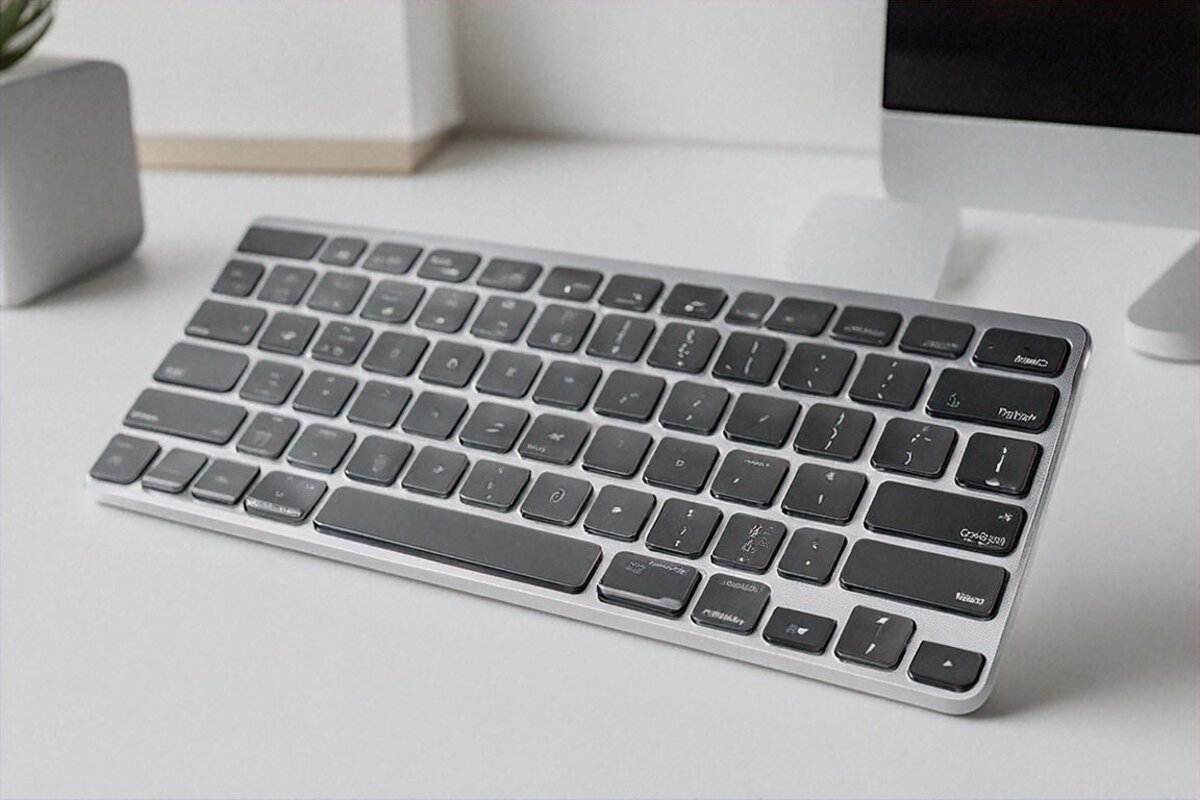
Three years on the flat little Magic Keyboard had quietly worn me down. The shallow keys were the problem — about a millimetre of travel, so every keystroke ended with my fingertips smacking aluminium. Tolerable when my days were meetings and short emails. Then my work tilted hard toward long-form writing and coding, eight or nine hours of it, and a dull ache settled into my wrists that never fully left. The board wasn’t bad. It just wasn’t built for what I’d started asking of it.
So I went shopping. I got close to pulling the trigger on a Keychron Q1 Max, even spent an evening reading NuPhy Air96 reviews. Lovely boards, both. But my setup is three Apple devices — a MacBook Air M3 as the daily driver, an iPad Pro for meeting notes, an iPhone for quick replies — and bouncing one Bluetooth keyboard between three machines is its own little nightmare. Unpair here, repair there, wait, hope it doesn’t grab the wrong device. I wanted instant switching, and most mechanical boards don’t really do that.
Apple’s Magic Keyboard Pro claimed it did. I’ve now put roughly 400,000 words through it over three months, so here’s the honest verdict.
So what actually makes it “Pro”
It’s basically the wishlist Apple keyboard owners have been muttering about for years. Three devices paired at once — Mac, iPad, iPhone — with dedicated keys to flip between them. A real 14-key function row with proper media and brightness controls. USB-C instead of Lightning, and it’ll pass data through, so peripherals can hang off the keyboard. A reworked scissor mechanism with 1.2mm of travel, the most any Magic Keyboard has had. A backlight with 16 brightness steps. And Touch ID baked in.
Most of that has been missing since the original Magic Keyboard shipped. Took them long enough.
Design and Build
Visually, nothing’s been rethought. It’s the same minimalist aluminium slab — clean edges, that restrained look you either warm to or you don’t. If you’ve handled a Magic Keyboard you already know the shape, just stretched a little taller to fit the function row up top.
That extra height is 25mm over the standard board. On paper it’s nothing; side by side it’s obvious. The payoff is the full function row, which the regular model has always gone without. Anyone who’s squinted at that cramped function strip and wished for normal-sized keys finally gets them.
The top plate is aluminium, cool under the fingers, and it feels like money in a way no plastic board manages. It comes in Silver and Space Grey; I went Space Grey to sit alongside the MacBook and it looks the part. At 430 grams there’s a reassuring weight to it — light enough to shove aside when you need the desk, heavy enough that it won’t skate around while you’re hammering away. The rubber feet hold their ground on wood and glass alike.
One gripe. There’s a fixed incline, maybe three or four degrees, and no feet or kickstand to change it. I’d have killed for even two tilt settings. Some of us want a steeper rake, some want it dead flat — Apple made the call for everyone. The default suits most wrists fine, but if you’ve got a specific ergonomic angle in mind, plan on a wrist rest or a stand.
How it feels to type on
This is the part I actually care about, and I’ll be opinionated, because typing is the job.
The new scissors give you 1.2mm of travel. For reference, the old Magic Keyboard sits around 1mm and a typical mechanical board runs 3 to 4mm. So 1.2mm is still firmly low-profile — nobody’s confusing this with a tactile mechanical switch. But that extra fifth of a millimetre punches above its number. Keys sink a touch further before they bottom out, the landing’s a little softer, and each press registers as an actual event instead of a flat thud.
Three months in, the wrist fatigue is genuinely better. Not gone — I still get up every hour or so — but that constant low ache has mostly faded. My guess is it’s the slightly deeper travel soaking up some impact plus the fact that I’m not slamming into the bottom on every key. Could be partly in my head. I don’t think it is, but I’ll own the possibility.
Stability’s the other win. The caps barely rock. I sit around 85 to 90 WPM when I’m in a groove, and there’s almost no sideways play, which cuts down on catching a neighbouring key. For coding that’s not trivial — one stray semicolon or bracket and you’ve signed up for a ten-minute debugging hunt.
And it’s quiet. Not silent — there’s a soft little thock on each press — but hushed enough for an open office, a video call, or a late writing stretch while someone sleeps in the next room. I’ve typed notes through Zoom calls and nobody’s flagged the noise once. My Keychron test unit, by contrast, came through the call audio sounding like a 1970s newsroom.
One detail that doesn’t make the spec sheet: I type Hindi a fair bit using macOS phonetic transliteration, and the key stability means fewer of those double-press moments that spit out garbled output. Sounds tiny. Over a long Hindi session, the corrections you don’t have to make add up to real minutes saved.
Three-device pairing is the whole point
This is the reason I bought it, full stop. Three devices live in memory at once, and you jump between them with fn+1, fn+2, fn+3.
Picture a normal hour. I’m drafting on the MacBook Air. A Slack ping lands on the iPad — fn+2, half a beat, keyboard’s on the iPad, I fire back a line. fn+1, back to the Mac. Come evening someone drops a long WhatsApp on my phone that deserves a proper answer — fn+3, type it like a human instead of thumbing glass, fn+1, back to work.
Switching usually lands in the half-second to one-second range. Not instant, but quick enough that it doesn’t snap your concentration. Maybe once a week or two a switch drags out to two or three seconds, which I’d bet is Bluetooth reconnecting rather than the keyboard itself. It’s never once failed to switch outright — which I can’t say for the third-party multi-device boards I’ve owned.
This one feature retired a USB switch and a spare keyboard I kept just for the iPad. Two keyboards and a switch became one keyboard. The desk feels open now, and when you live at that desk ten or twelve hours a day, the extra room isn’t a small thing.
USB-C and Data Passthrough
Lightning’s gone, finally. Charging and wired use both run over USB-C now. The twist is the passthrough: plug a hub or a drive into the keyboard’s USB-C port, run the cable to your Mac, and you reach that peripheral straight through the keyboard.
In practice I’ve run a USB card reader through it to pull photos off my camera’s SD card. Worked first time, no fuss — one fewer cable snaking round the back of the MacBook. I don’t reach for it daily, but on the days I need it, it’s a neat trick.
USB-C also opens up wired mode and zero-latency input. For the coders — if you’ve ever sworn you felt a hair of lag on Bluetooth mid-sprint, wired kills it outright. Truth is the Bluetooth 5.3 latency is already below anything I can notice in normal use, but it’s nice having the cable option for the people who want certainty.
Touch ID
The fingerprint reader sits top-right and behaves just like the one on a MacBook — log into the Mac, approve Apple Pay, autofill passwords in Safari, confirm a settings change. It reads me right about 95% of the time; the misses come when my fingers are bone-dry or I plant them at a weird angle, which is true of every Touch ID sensor I’ve touched.
If you run a Mac mini or Mac Studio — desktops with no built-in Touch ID — this keyboard is pretty much the only sane route to biometric login short of a separate dongle. For desktop users sick of typing their password fifty times a day, that alone might close the deal.
Backlight
Sixteen brightness steps, set by hand or left to the ambient light sensor. The even spread across the keys genuinely impressed me — none of that bright-centre, dim-edges thing some backlit boards do. Every legend lights uniformly. In a dark room on a middling setting the keys read clearly without glaring at you, and in good daylight the light dims or cuts out to save the battery.
The sensor turned out to be the bit I appreciate most, which I didn’t see coming. Walk into a dim room, sit, type — it’s already at the right level. Move somewhere bright and it backs off on its own. One less thing rattling around in my head. Small. Still nice, every day.
Battery Life
Apple quotes roughly 12 months per charge. I can’t confirm that off three months of use, but I can tell you I haven’t charged it once since I opened the box, and macOS still reads the level as “High.” That’s three months of daily abuse, eight to twelve hours a day, backlight on auto, Bluetooth on the whole time. If it really stretches to a year, that’s something. Even if it’s “only” six or eight months, it still buries every rechargeable keyboard I’ve owned.
It charges off the bundled USB-C cable, and you can keep typing in wired mode while it tops up — so even a flat battery never leaves you keyboard-less.
Specifications
| Specification | Details |
|---|---|
| Layout | Full-size with 14-key function row |
| Pairing | Bluetooth 5.3, multi-device (3 simultaneous) |
| Connection | USB-C with data passthrough |
| Touch ID | Yes — fingerprint authentication |
| Backlight | 16 levels, adjustable with ambient sensor |
| Battery | ~12 months |
| Weight | 430g |
| Compatibility | Mac, iPad, iPhone |
Pros
- Multi-device pairing for 3 devices with near-instant switching
- USB-C with data passthrough — finally no more Lightning
- Touch ID for biometric login on desktop Macs
- Best typing feel of any Magic Keyboard generation — 1.2mm travel makes a real difference
- Battery life measured in months, not days or weeks
Cons
- Rs. 34,900 for a keyboard is objectively expensive — there’s no way around that
- No numeric keypad option available at launch
- Apple ecosystem only — won’t work with Windows or Android devices
- No wireless charging for the keyboard itself
Let’s talk about that price
Rs. 34,900. For a keyboard. Yeah, I had your face too when Apple announced it. That’s a decent laptop. Two mid-range phones. A solid mechanical board plus a good mouse plus a monitor arm, with dinner money left over.
Here’s how I made peace with it, though. I’m at the keys eight to ten hours on a working day. Across a year that’s somewhere around 2,500 to 3,000 hours. Over the three-to-five years this thing should last, call it 7,500 to 15,000 hours of use. Divide Rs. 34,900 by that and you land near Rs. 2.3 to 4.6 an hour — less than a cup of chai — for a tool that shapes your comfort and output for years. Framed that way it stops sounding mad.
If typing is just something you do between other things — a few emails, some browsing, the odd spreadsheet — this is overkill, and the standard Magic Keyboard at Rs. 10,900 will serve you fine. The Pro is aimed at people whose keyboard is the tool: writers, journalists, programmers, content folk, support agents. The way a chef won’t skimp on a knife, you don’t skimp on the thing under your hands ten hours a day.
Who should walk away
Windows users. It flat-out won’t run with Windows or Android — the Apple lock-in here is total. And if even one machine in your day is non-Apple, the three-device trick loses a chunk of its shine.
Mechanical diehards chasing deep travel, hot-swap switches, and endless tweaking. The Pro is polished, but it isn’t a mechanical board and doesn’t pretend to be. If 3 to 4mm of travel and the snap of Cherry MX switches is your religion, this won’t convert you.
Anyone who needs a number pad. There’s no numpad version at launch. If your days run on spreadsheets or accounting software and your right hand lives on a numpad, you’ll feel the missing block every single day. Apple will probably ship one eventually, but “eventually” doesn’t help you now.
Price in India
It’s Rs. 34,900 in India, sold through Apple India’s site, the Apple Store app, Amazon India, and authorised resellers like Imagine and iStore. Apple’s student pricing can knock a few thousand off, so check whether you qualify before you pay full freight.
What it actually changed about my day
Three months on, here’s the real-world impact, no spin.
My speed didn’t budge — still 85 to 90 WPM. I never expected a keyboard to make me faster, and it didn’t. What shifted is how I feel afterwards. That end-of-day wrist ache that had basically moved in? Down a lot. Not gone, but enough that I notice. I’m willing to sit and write in the evenings again, something I’d been ducking because my wrists were already sore by sundown. My daily word count’s up maybe 15 to 20% — not from faster fingers, just from lasting longer before the discomfort kicks in.
The device switching quietly changed how I use the iPad too. It used to live in a drawer because pecking at the on-screen keyboard was annoying enough to put me off. Now it’s on the desk and I hop to it several times a day — notes, quick jobs, reading an article while the MacBook chews through a compile or a render. iPad usage has roughly tripled.
And clearing the spare keyboard and the USB switch off the desk did something to my head as much as my desk. A tidy surface with one good keyboard on it just feels better than a cable nest. Sounds daft. Made a genuine difference to my mood.
Is all of that worth Rs. 34,900? For me — someone who writes and codes for a living, lives entirely in Apple’s world, and types eight to twelve hours a day — yes, with no asterisk. The comfort and the smoother workflow have already earned it back in hours I’ve actually used and pain I’ve dodged. Different needs, different habits, different budget, and your answer might land somewhere else entirely. But I haven’t regretted it for a single day.
Full Specifications
| Layout | Full-size 14-key function row |
|---|---|
| Pairing | Bluetooth 5.3 3-device multi |
| Connection | USB-C data passthrough |
| Touch ID | Yes fingerprint |
| Backlight | 16 levels adjustable |
| Battery | ~12 months |
| Weight | 430g |
Pros
- Multi-device 3-device pairing
- USB-C data passthrough
- Touch ID authentication
- Best Magic Keyboard typing feel
- 12-month battery
Cons
- Very expensive ₹34,900
- No numeric keypad version
- Apple devices only
- No wireless keyboard charging
Our Rating: 8.5/10 · Price: ₹34,900


0 Comments