
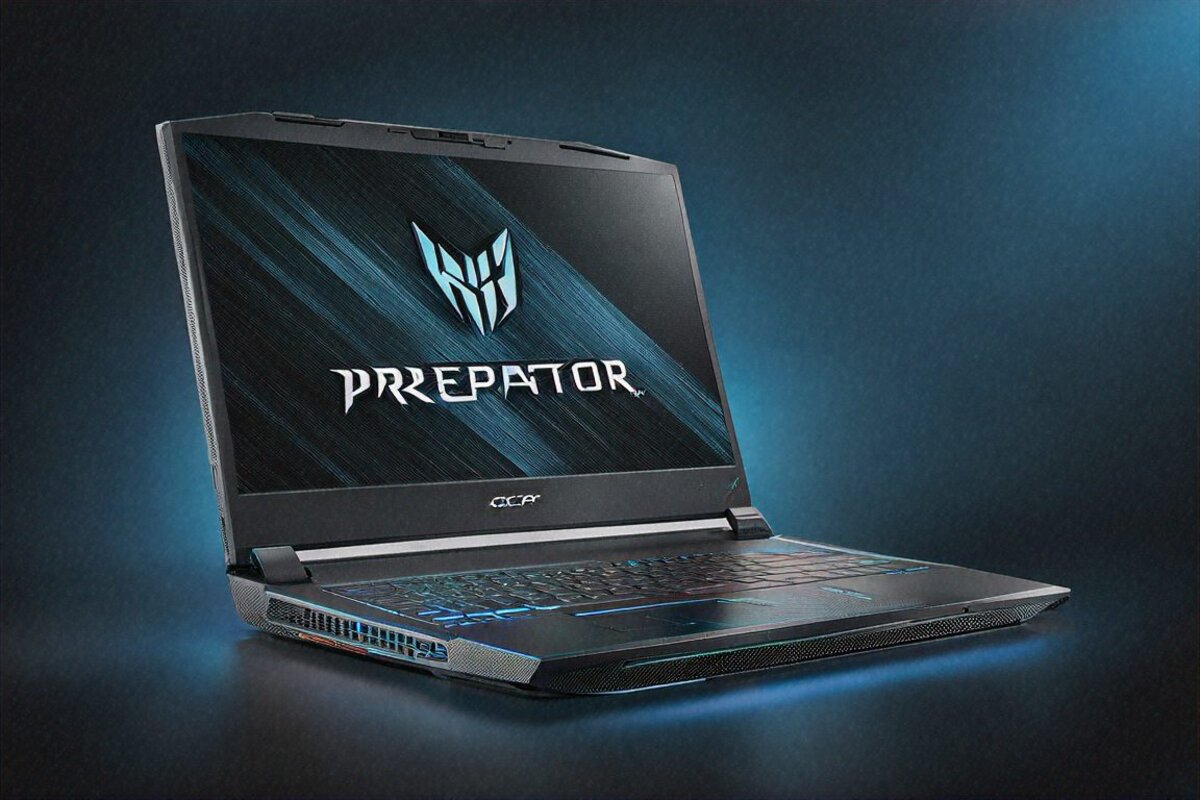
23,847 — That’s the 3DMark Time Spy Score
I ran it three times because I didn’t trust the first number. Same result each go: 23,847 on 3DMark Time Spy. To put that in context, a desktop RTX 4080 lands somewhere around 22,000 to 23,000 on the same test. So a laptop matched a desktop card. Sit with that for a second.
The Helios 18 runs its RTX 4090 at the full 175W TGP, and it pretty much ignores whatever you assumed a laptop could do. If what you want is raw, unthrottled gaming muscle — and you’ll swallow every trade-off that comes attached to it — this is the machine that hands it over.
Hardware Stack — Everything Turned Up to Maximum
Start with the chip: an Intel Core i9-14900HX, 24 cores split 8 Performance, 8 Efficient, 8 threads. Graphics come from NVIDIA’s RTX 4090 Laptop running at 175W TGP, which is the full mobile part, not some power-clipped version of it. You also get 32GB of DDR5-5600 (room to go to 64GB), and a pair of 1TB PCIe Gen 4 NVMe drives striped in RAID-0 for 2TB of very fast storage. Up front sits an 18-inch Mini-LED IPS panel, 2560×1600, 240Hz, 100% DCI-P3, with 500-zone local dimming.
Wireless is handled by Killer Wi-Fi 7, and there’s a 2.5 Gigabit Ethernet port if you’d rather run a cable. Two 140mm AeroBlade 3D metal fans keep it alive, with liquid metal on both the CPU and GPU. Audio comes from a four-driver soundbar, 5W each.
The price tag? ₹1,89,999. Basically two lakh. Yeah.
Design — Desktop Replacement, No Disguises
Plenty of gaming laptops these days pretend to be office machines. This one doesn’t bother. It’s loud in every meaning of the word — the look, the footprint, and the actual decibels once it gets going. Sharp angular cuts on the lid, RGB on the rear vents, the keyboard and the lid logo. The chassis measures 27mm thick and weighs 3.1 kilograms, and you feel that in your arm the moment you lift it.
It’s well built, though. That keyboard deck doesn’t flex despite how wide it is, and the hinges hold the big panel steady with no wobble. Most of the shell is hard plastic braced with metal where it counts. Nothing feels flimsy, even if it can’t match the milled-aluminium finish of something like a Razer Blade.
What the 18-inch size buys you is immersion. Sitting at arm’s length, gaming on this feels much closer to a desktop monitor than any 15 or 16-inch laptop manages. Films swallow your peripheral vision, spreadsheets show more rows, code editors show more lines. Spend a week on an 18-inch screen and a 15.6-inch one suddenly feels claustrophobic.
Portability, on the other hand, isn’t happening. Technically it’s a laptop — hinge, battery, folds shut. But hauling 3.1kg plus the 240W brick (another 700-odd grams) around in a bag wears thin fast. I’d call it a desk-to-desk machine, not a coffee-shop one. It barely squeezes into my usual backpack and pokes out the top where everyone can see it.
The Display — Mini-LED Gets Serious
Acer skipped OLED here and went Mini-LED IPS instead. The 18-inch panel runs 2560×1600 at a 16:10 ratio, 240Hz, and its 500 dimming zones get the contrast close to OLED in scenes that have a clear bright-versus-dark split. HDR brightness peaks near 1200 nits, which is brighter than most OLED laptop screens you’ll find.
Is it OLED-level? On black depth and contrast, no. Those 500 zones produce visible blooming when something bright sits on a dark field — a small white logo on a black loading screen is the classic example, and you’ll catch it. In actual gameplay, though, I almost never did. The 240Hz panel with 1ms response makes motion ridiculously clean for competitive shooters, and the brightness edge over OLED means you can play in a bright room without maxing the backlight.
Colour at 100% DCI-P3 holds up well. As a gaming display that moonlights for content work, it’s solid — though anyone doing colour-critical work for a living would still reach for a proper OLED or a reference monitor. Viewing angles are wide enough that a friend can lean in and watch without the colours shifting on them.
Gaming Performance — Benchmark After Benchmark After Benchmark
This is the whole reason the thing exists, so let me just put the numbers down.
Cyberpunk 2077, Ultra, ray tracing on Overdrive, DLSS Quality at native 2560×1600: a steady 55-60 fps. Drop ray tracing one notch to Ultra and it climbs to 70-80. Run it at 1080p with DLSS Performance and full RT, and you’re past 120 fps. The most punishing game out there runs lovely on this hardware.
Warzone at max settings stayed above 180 fps. Forza Horizon 5 at Ultra with ray tracing, native res, locked to 90. Hogwarts Legacy at Ultra sat at 75-80. Alan Wake 2 at High with RT held 55-60 at native res, which is genuinely impressive given how mean that game is to hardware. Baldur’s Gate 3 at Ultra cleared 100 fps and never dipped.
Knock everything down to 1080p with DLSS Performance and every AAA title I threw at it went past 180 fps, most of them past 200. So the 240Hz panel actually earns its keep here — which I can’t say for a lot of laptops that ship a 240Hz screen bolted to a GPU too weak to feed it.
The i9-14900HX never once held the RTX 4090 back in anything I played. Open-world games hammering the CPU with draw calls, strategy games piling on units, even scrappy indie titles leaning on a single thread — the 24-core chip took it all in stride. Its Time Spy CPU score hit 17,200-plus, roughly desktop i7-14700K territory.
Multi Frame Generation with DLSS 4 pushes frame rates another 40-60% in games that support it, at the cost of a frame of latency. Competitive players will probably switch it off. For a slow single-player story, though, turn it on and enjoy the smoothness.
Cooling — The Real Engineering Achievement
Keeping a 175W RTX 4090 and a full-power i9-14900HX from throttling inside a laptop shell is the kind of thermal problem that trips up most manufacturers. Acer’s answer is the AeroBlade 3D fans plus liquid metal on both chips, and from what I saw, it holds together.
GPU temps during long Cyberpunk runs sat at 84-88 degrees Celsius. CPU figures came in at 88-94. Safe, but high — the headroom is thin. In an air-conditioned room at 24 degrees, everything stayed rock steady. In a Delhi summer room with no AC and ambient temps past 35, you might catch some throttling. I tried both: the AC room was fine, the non-AC room dropped frames by 3-5% now and then during heavy scenes.
Now the fans. I’ll be blunt. At full tilt in Turbo mode this thing is LOUD. I measured 52-55 dB from a normal seat — louder than two people talking. Gaming headphones aren’t a suggestion here, they’re required, unless you want the whole room tracking your GPU load by ear. Even Balanced mode, which trims performance a touch, leaves the fans around 45-48 dB. Only Silent mode (which chokes the GPU hard) gets it down to something I’d call quiet.
Surface heat while gaming: the middle of the keyboard climbs past 45 degrees. WASD stays cooler at 38-40, clearly by design. Underneath, it hits 50-plus, so lap gaming is a bad idea. Palm rests stay near 35, which is fine.
Battery Life — Let’s Be Realistic
The 90Wh battery gets you 3-4 hours of gaming, which makes it more of a UPS for a power cut than any real mobile setup. Switch to productivity mode with the discrete GPU off and you’ll see 5-6 hours of light work — browsing, docs, email.
For anything serious, it lives on the cord. The 240W brick is chunky (that’s the extra 700 grams in your bag again) and non-negotiable if you want full performance. USB-C charging at lower wattage exists for travelling light, but you’re throwing away about 80% of what the machine can do.
Honestly, I don’t count battery as a fair knock against a laptop in this class. You don’t buy a 3.1kg RTX 4090 desktop replacement and then expect to work off a park bench. It’s a desktop that happens to fold shut, not a phone.
Productivity and Content Creation
Something people forget about laptops like this: the hardware that runs games at Ultra also tears through professional work. Those RTX 4090 CUDA and Tensor cores speed up Blender renders, AI training, video encoding in DaVinci Resolve, and Stable Diffusion. And the 24-core CPU eats heavy compiles, big data jobs, and simulation work that would choke a smaller machine.
Stable Diffusion, which more designers and creators lean on these days, churned out roughly 45 images a minute at 512×512 on the RTX 4090. For prompt-and-iterate AI work, that speed turns a tedious wait into something you can actually flow with.
I had a chunky Blender scene that takes 12 minutes on my everyday work laptop (an RTX 4060). On the Helios 18 it finished in under 4. A 25-minute 4K Premiere Pro export wrapped in about 8 minutes. If you bill by the project and rendering time eats your margin, this machine buys itself back in saved hours.
That RAID-0 array (two 1TB Gen 4 drives) pushes sequential reads above 10,000 MB/s. Load times basically vanish, big project files snap open. And the 32GB of DDR5-5600 (good for 64GB later) handled stacked 4K timelines, fat Photoshop files, and a forest of browser tabs without complaint. And if your work really gorges on memory, the path to 64GB is sitting right there.
Connectivity
The port loadout is generous: Thunderbolt 4, USB-C, three USB-A 3.2, HDMI 2.1, a full-size SD reader, a 2.5 Gigabit Ethernet jack, and a combo audio port. The Killer Wi-Fi 7 radio gives the lowest-latency wireless I tested — 8-10ms ping to Mumbai servers on Wi-Fi 7 against 12-15ms on Wi-Fi 6E. When single-digit milliseconds decide a match, that gap matters.
PredatorSense runs the fan profiles, performance modes, GPU and RAM overclocking, and the per-key RGB. It works, even if it’s a bit overstuffed. Set your profiles once and you’ll mostly leave it shut after that.
Full Specifications
| Specification | Details |
|---|---|
| Processor | Intel Core i9-14900HX, 24 cores |
| GPU | NVIDIA RTX 4090 Laptop, 175W TGP |
| RAM | 32GB DDR5-5600 (upgradeable to 64GB) |
| Storage | 2x 1TB PCIe Gen 4 NVMe RAID-0 |
| Display | 18″ Mini-LED IPS, 2560×1600, 240Hz, 500-zone dimming |
| Battery | 90Wh (3-4 hours gaming, 5-6 hours productivity) |
| Weight | 3.1 kg (+ ~700g adapter) |
| Cooling | Dual 140mm AeroBlade 3D fans, liquid metal TIM |
| Audio | Quad speakers, 4x 5W drivers |
| Ports | TB4, USB-C, 3x USB-A, HDMI 2.1, 2.5G LAN, SD, 3.5mm |
| Wireless | Killer Wi-Fi 7, Bluetooth 5.4 |
| OS | Windows 11 Home |
Pros
- Full-power RTX 4090 at 175W — fastest mobile GPU, no compromises
- 18-inch 240Hz Mini-LED with 500-zone dimming for immersive visuals
- Killer Wi-Fi 7 delivers lowest-latency wireless gaming
- 24-core i9-14900HX eliminates CPU bottlenecks in every game
- Effective cooling maintains sustained performance under load
- RAID-0 storage hits 10,000+ MB/s sequential reads
Cons
- 3.1kg + adapter weight makes portability impractical
- Fan noise under load is extremely loud — headphones mandatory
- 3-4 hours gaming battery is a cord-dependent experience
- ₹1,89,999 is a massive investment
- Surface temperatures get uncomfortably hot during gaming
Keyboard, Speakers, and Webcam
The per-key RGB keyboard with anti-ghosting and N-key rollover does what a gaming board should. Key travel is around 1.8mm, more than most slim gaming laptops give you, and the feedback stays satisfying deep into a long session. I typed plenty of documents on it during my productivity days and never felt the pull toward an external board. The WASD keys carry a faint texture so your fingers find home without looking. There’s a row of macro keys on the left for the MMO and MOBA crowd who bind abilities to spare.
The speakers earn a paragraph of their own. Four 5W drivers, 20W total, and the sound is genuinely good for a laptop. There’s actual bass, vocals come through clean, and the soundstage is wide enough that I could place audio cues in games without headphones. Watching a film on these is something I’d happily do, which is rare. You’ll still want a headset for competitive play and positional accuracy, but for casual sessions and media, the built-ins hold up better than they have any right to.
The webcam is 1080p with a privacy shutter. Fine for calls, nothing more. Stream regularly and you’ll want a real camera anyway.
Who This Is Actually For
Not the casual gamer. Not the student who needs a class machine with a bit of gaming after hours. Not the frequent traveller. Not anyone who cares about weight or battery first.
It’s for one buyer, really: you want desktop-grade gaming, you’ve got no space (or no appetite) for a full tower, and you need to shift your rig between rooms — your place and a friend’s, a dorm and home over the break. You take the weight, the noise, the brick, the heat, and the price because the alternative is a tower that never moves at all.
For India’s growing LAN-party scene, this is the machine to lug in. For streamers who play and create on the same box, the RTX 4090 and i9-14900HX run OBS encoding alongside high-frame-rate gaming without flinching. For 3D artists and editors who also game, getting both jobs from one machine genuinely beats buying two.
Everyone else has better options. Lighter ones, quieter ones, cheaper ones. The ASUS ROG Zephyrus G16 at ₹1,79,999 gives you about 85% of the gaming chops at half the weight. A Lenovo Legion Pro 7i puts up strong RTX 4080 numbers for less. The MSI Raider 18 goes head to head with it, trading cooling and display quality in different directions.
The Helios 18 was never built to be everyone’s pick. It’s built to be the best possible pick for one narrow kind of buyer — and at that, it likely beats anything else you can get in India right now.
Three weeks in, I’d finished two full AAA campaigns on it, benchmarked every demanding title I own, and run a couple of Blender projects just to watch them fly. Everything finished faster, looked sharper, or ran smoother than on any laptop I’ve tested. If your days look like that — full performance, no compromise, parked at a desk most of the time — the Helios 18 does exactly what Acer puts on the box. Not a thing more, not a thing less. And that’s plenty.
Price in India
The Acer Predator Helios 18 2026 sells for ₹1,89,999 in India, through the Acer India site, Amazon India, Flipkart, and the better gaming-laptop stores. Stock tends to be thin given how niche the price is, so check availability before you assume you can stroll into a shop and grab one. Ordering online for delivery is the surer bet, especially away from the metros. The extended warranty is worth a look at this money — the three-year accidental damage plan costs a few thousand rupees and covers a ₹1.9 lakh machine against the drops, spills, and surges that would otherwise wreck your wallet.
Full Specifications
| Processor | Intel Core i9-14900HX 24-core |
|---|---|
| GPU | NVIDIA RTX 4090 175W |
| RAM | 32GB DDR5-5600 max 64GB |
| Storage | 2TB PCIe Gen 4 RAID |
| Display | 18" Mini-LED IPS 2560×1600 240Hz |
| Battery | 90Wh 3-4hr gaming |
| Weight | 3.1 kg |
| OS | Windows 11 Home |
Pros
- RTX 4090 175W fastest mobile GPU
- 18-inch 240Hz display
- Killer Wi-Fi 7
- 24-core i9 CPU
- AeroBlade 3D cooling
Cons
- Heavy 3.1kg
- Very loud under load
- 3-4hr gaming battery
- Expensive ₹1,89,999
Our Rating: 8.7/10 · Price: ₹1,89,999
0 Comments