
When you line up the Motorola Edge 50 Pro against the Realme GT 7 Pro and Xiaomi 15 Pro — phones it directly competes with at ₹35,999 — something interesting becomes clear almost immediately. It doesn't win on specs. It doesn't win on camera hardware. It doesn't win on charging speed or raw processing grunt. And yet, after spending roughly three weeks switching between all three as my daily driver, the Motorola is the one I kept coming back to. Why? Because sometimes how a phone feels matters more than what's printed on the box, and Motorola seems to understand that in a way most Chinese brands don't.
That probably sounds vague and hand-wavy. I get it. "Feel" is subjective and hard to quantify in a review where people want concrete comparisons and definitive answers. So let me try to explain what I mean by breaking down every aspect of the Edge 50 Pro, being specific about where it stands against the competition, and letting you decide whether the trade-offs align with what you personally care about in a phone.
A bit of background on my relationship with Motorola: I used a Moto G-series phone as my secondary device for about six months last year, and the clean software experience left a strong impression. So I came into this review with some positive bias, which I'll try to be transparent about where relevant.
What Motorola Brings to the Table
- MediaTek Snapdragon 7 Gen 3 paired with 8GB LPDDR4X RAM
- 6.67-inch pOLED display with a 144Hz refresh rate
- Near-stock Android 14 running under Motorola's light MyUX skin
- 50MP main camera with OIS for stabilised shooting
- Three-year OS update guarantee from Motorola
- An ultralight 185-gram body with IP68 water resistance
Design and Build — Where Motorola Makes Its Argument
185 grams. That number might not mean much on paper, but pick up the Edge 50 Pro after using literally any other modern smartphone and you'll feel the difference in your palm within seconds. Most phones at this price weigh 200-215 grams. Twenty to thirty grams less doesn't sound like much in the abstract until you've been holding a phone for an hour-long call with your mother, or scrolling through your feed in bed with one hand at midnight, or walking around with it in a shirt pocket without it pulling the fabric down like a pendulum. These are everyday scenarios that spec sheets never capture but that affect how you feel about your phone every single day.
Motorola's achieved this weight while maintaining IP68 water resistance and an aluminium frame, which is impressive engineering that I suspect most buyers won't fully appreciate. The phone doesn't feel flimsy or hollow — it feels intentionally light, like someone actually sat in a room and thought carefully about what it's like to carry a phone all day every day. There's a precision to the weight reduction that suggests thoughtful material choices rather than just using cheaper, lighter parts.
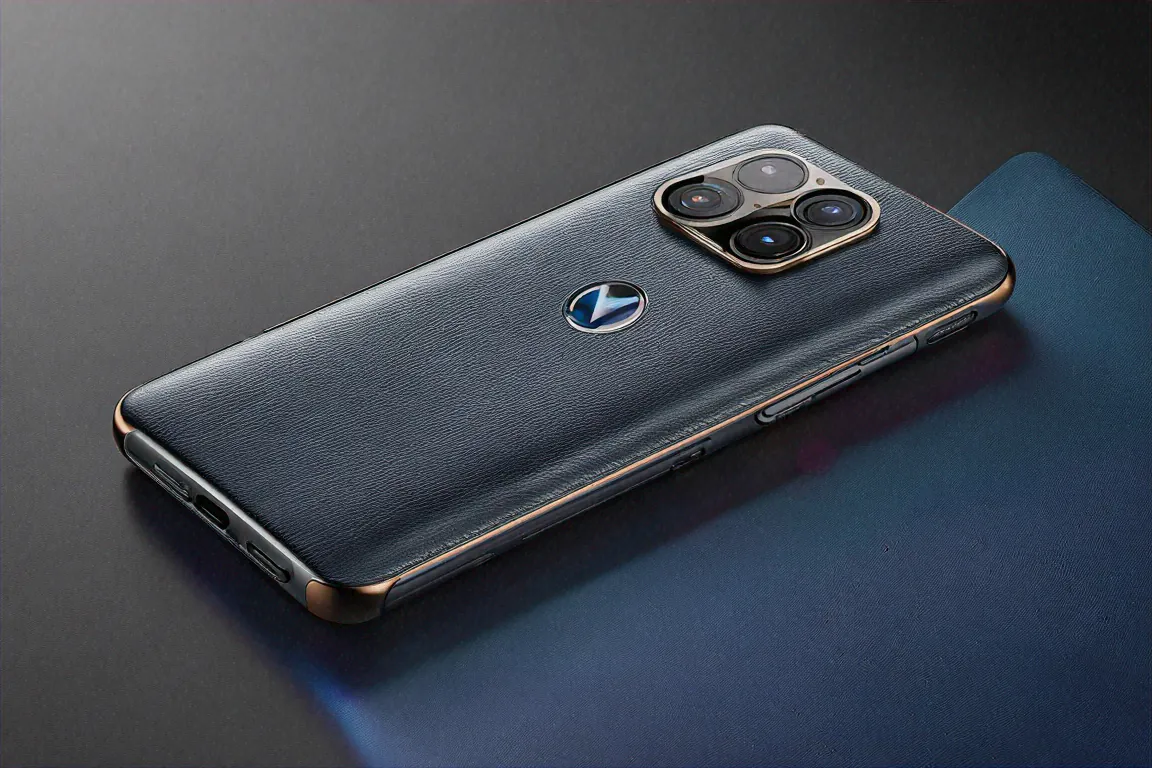
The Nebula Blue variant with its vegan leather back is genuinely distinctive. In a market where every phone is glass-metal-glass, having a textured leather-like finish that doesn't collect fingerprints and provides natural grip is refreshing enough to feel like a breath of fresh air. I haven't used a case during my entire testing period because the vegan leather provides enough grip that I never felt the phone would slip. Try doing that with a glass-backed Samsung or Xiaomi — you'll be fishing your phone off the floor within a week. The classic Black version uses textured glass, which is fine but significantly less interesting and less grippy.
Curved display edges continue Motorola's Edge series signature look — some people love them for the immersive visual effect, some people hate them for the accidental palm touches they cause. I'm in the "they look elegant but occasionally cause accidental palm touches that disrupt what I'm doing" camp. During gaming sessions I noticed my palm triggering the edge of the screen maybe two or three times per session, which is annoying but not devastating. Motorola's edge rejection algorithm catches most accidental inputs, but not all of them.
Panda Glass protects the front display. Not Gorilla Glass Victus, not Ceramic Guard, but Panda Glass — a lesser-known Chinese brand that's actually quite tough in my experience. I didn't have any scratch issues during my three weeks of use without a screen protector, though I'd still recommend applying one if you tend to keep your phone and keys in the same pocket. Better safe than sorry, regardless of what protection the glass brand claims to offer.
Display — Clean and Honest
A 6.67-inch pOLED panel with 144Hz refresh and 2400 nits peak brightness. Solid numbers, but what really sets this display apart from competitors at the same price is Motorola's calibration philosophy, and it's a philosophy I wish more manufacturers would adopt.
Where many competitors crank saturation up to eleven so phones look great on the shelf in a Croma store — electric blues, radioactive greens, skin tones that look like everyone's been on a tropical vacation — Motorola has calibrated for accuracy. Colours look true to life. Skin tones look like actual skin, not the airbrushed-Instagram version. Greens in landscape photos look like actual foliage. White backgrounds in apps look clean and neutral rather than warm or blue-tinted. If you're someone who edits photos on your phone or cares about colour fidelity for any reason, this matters more than peak brightness numbers or resolution specs that look good on comparison charts.
Full HD+ resolution at this screen size is perfectly fine — I know some reviewers and YouTube commenters complain about not getting 2K resolution at ₹35,000, but honestly, I can't tell the difference in normal daily use unless I'm pressing my nose against the screen looking for individual pixels. Which I don't do when I'm reading the news, scrolling Instagram, or watching videos. And neither do you. At normal viewing distance, the pixel density is more than sufficient for everything except perhaps VR use, which isn't a common use case for a phone at this price.
Dolby Vision support means compatible content on OTT platforms renders properly with extended dynamic range and accurate colour grading. I tested this with Dolby Vision content on Netflix and the difference compared to SDR playback was immediately visible — brighter highlights, deeper shadows, more nuanced colour gradients in scenes with complex lighting. The under-display optical fingerprint sensor is quick and reliable — I'd estimate about a 95% first-attempt success rate, which is on par with most competitors at this price. The remaining 5% of failures were almost always with wet or slightly oily fingers, which is a common limitation of optical sensors.
HDR content looks great overall, blacks are properly deep (it's OLED, they'd better be), and the viewing experience is comfortable for extended periods. Here's something I noticed that's hard to pin down objectively: the display doesn't fatigue your eyes as much as some of the more aggressive, oversaturated panels out there. After an hour of reading or scrolling, my eyes felt less strained than they typically do on phones with punchier displays. I suspect this is related to the accurate colour calibration and lack of oversaturation, but it could also be placebo. Worth noting either way.
Camera System — Reliable, Not Record-Breaking
This is where I need to set expectations properly, because the Edge 50 Pro's camera is neither terrible nor outstanding. It sits squarely in "good enough for most people" territory, and I think Motorola is okay with that positioning. They're not trying to compete with Xiaomi or Samsung on camera specs — they're offering a competent camera on a phone that excels elsewhere.
The 50MP main sensor with OIS delivers reliable results for the kind of photography most people actually do — snapping food at restaurants to share on stories, capturing moments at family gatherings, taking quick travel photos for Instagram, scanning documents, shooting a video of your dog doing something funny. For these use cases, the Edge 50 Pro's main camera does everything you need. Daylight shots come out well-processed with good detail, accurate colours that match what your eyes actually saw, and decent dynamic range that preserves both highlights and shadows in most outdoor scenes.
Nothing in the output will blow your mind if you're comparing pixel-for-pixel against a Samsung S26 FE or Xiaomi 15 Pro. But nothing will embarrass you either. The photos are consistently good, which is actually an underrated quality — I'd rather have a camera that produces B+ results every single time than one that produces A+ results half the time and C results the other half.
Portrait mode produces clean background separation that looks natural. I shot some portraits of friends at a cafe in Koramangala, Bangalore, and the results were consistently good — edge detection handled hair and glasses without the tell-tale halo artefacts you sometimes see on budget phones. Background blur has a natural gradation that looks like actual lens bokeh rather than a software filter applied with a digital scalpel. My friends were pleased with the results, which is the ultimate real-world test for a portrait camera.
Night photography is where the limitations show most clearly. Testing low-light shots around Mumbai's streets revealed acceptable noise control but nothing that'll challenge the Xiaomi 15 Pro or the Pixel phones in this price range. Well-lit indoor environments look fine — restaurants, cafes, living rooms with good lighting produce usable photos. Step outside at night to genuinely dark streets, and you'll notice softer details, more noise in shadow areas, and colours that lose some of their accuracy. It's competent. Not class-leading. A consistent B- grade that won't wow anyone but won't ruin your memories either.
The 10MP 3x telephoto provides zoom capability that's useful in a pinch, but the low resolution caps the detail you can extract at any zoom level. Zoomed shots look acceptable on a phone screen at normal viewing, less so if you try to print them or display them large or crop into them further. For WhatsApp profile pictures or quick snapshots of something across the street, it works. For anything requiring detail retention, you'll be disappointed. The 13MP ultrawide is... adequate. It captures wide shots without significant distortion at the edges, colours remain reasonably consistent with the main sensor, and that's about all I can say about it without being either dishonest or unnecessarily harsh.
Video recording at 4K 30fps with OIS stabilisation on the main camera produces smooth enough footage for social sharing. Audio capture is decent. Not remarkable, not terrible. Consistent with the rest of the camera experience — reliable and workmanlike.
Here's the thing though — if camera performance is your primary buying criteria, the Edge 50 Pro isn't the phone for you, and that's okay. Not every phone needs to win at photography. Motorola's put their emphasis elsewhere, and for buyers who share those priorities, the camera being "good enough" is exactly that — good enough.
Performance and Daily Use — The Clean Android Advantage
The Snapdragon 7 Gen 3 is a capable chipset that sits comfortably in the upper tier of mobile processors available in India right now. It's not quite at the level of the Snapdragon 8 Gen 5 in synthetic benchmarks, particularly GPU-intensive tests where Qualcomm's Adreno GPU maintains a measurable lead — gaming enthusiasts who track frame rate graphs and benchmark scores will notice a difference in the most demanding titles. For literally everyone else, this chip handles everything thrown at it without complaint and probably without any perceptible difference from the Snapdragon in daily use.
BGMI runs at High settings without drama. Social media apps scroll at full 144Hz smoothness. Video editing in apps like InShot or CapCut works without rendering lag. Chrome with a dozen tabs open doesn't slow the phone down. The phone never felt slow during my entire three-week testing period, not once, not even briefly. Part of that is the chip doing its job, but I think a bigger part of the credit goes to the software.
Near-stock Android 14 with MyUX is where Motorola's real value proposition lives, and this is the part of the review where I get most enthusiastic because it's genuinely rare to find this level of software quality at this price. If you've ever used a Pixel phone and appreciated the clean, uncluttered, bloatware-free experience — the feeling that your phone is working for you rather than against you — the Edge 50 Pro delivers something remarkably similar.
No pre-installed games. No duplicate apps that compete with Google's own offerings. No notification spam from system services trying to sell you stuff or push you towards some partner app you never asked for. No "recommended content" appearing in your notification shade. Open the app drawer and you'll see Google apps, a few Motorola utilities (Moto app, device health services), and... that's it. The contrast with phones running MIUI, Funtouch OS, or ColorOS — where you spend the first half hour after setup uninstalling junk — is stark and refreshing.
Moto Actions is a genuinely useful set of gestures that I miss every time I switch to another phone. Twist your wrist twice to launch the camera. Quick, natural, doesn't require you to unlock the phone or find the camera icon. Chop twice (a quick karate-chop motion) to toggle the flashlight — incredibly handy when you're walking to your car at night or looking for something under the bed. These gestures feel natural after a day of use and genuinely speed up common tasks in a way that no other manufacturer's gesture system manages. I've been surprised by how much I notice their absence when using other phones.
The always-on display is customisable without requiring a third-party app — clock styles, notification previews, battery status, all configurable from the native settings. Small thing, but it reflects Motorola's understanding that customisation shouldn't require extra downloads or workarounds.
Battery life from the 4500mAh cell is comfortable. Not the best I've tested in this price range, not the worst. A moderate use day (social media, streaming, some photography, messaging, occasional navigation) consistently leaves me with 25-30% by bedtime. Screen-on time averaged around 6 hours on mixed-use days, which is solid. Heavy gaming or extended camera use drains it faster obviously — budget for a mid-afternoon charge if you're a heavy user who games for multiple hours daily.
Motorola's 125W TurboPower charging fills the battery from zero to full in roughly 55 minutes. That's slower than the 100W+ speeds some Chinese phones offer at this price — Realme hits 100W, iQOO reaches 120W — and this is genuinely the one spec-sheet comparison where I think Motorola loses ground unfairly. 68W isn't slow by any absolute standard, and a 15-minute quick charge gives you enough juice for a few hours of use, but when competitors are charging in 30-35 minutes at the same price, the 55-minute fill time feels like an area where Motorola could have been more aggressive.
Detailed Specifications
| Specification | Details |
|---|---|
| Processor | MediaTek Snapdragon 7 Gen 3 |
| RAM | 8GB/12GB LPDDR4X |
| Storage | 256GB UFS 2.2 |
| Display | 6.7" pOLED, 2400x1080, 144Hz |
| Main Camera | 50MP f/1.8 OIS |
| Ultrawide | 13MP f/2.2 |
| Telephoto | 10MP 3x f/2.5 |
| Battery | 4500mAh |
| Charging | 125W TurboPower wired |
| OS | Android 14, MyUX |
| IP Rating | IP68 |
| Weight | 186g |
Pros & Cons
Pros
- Near-stock Android experience with MyUX — minimal bloat, maximum usability
- Three-year OS update commitment gives longevity
- Excellent pOLED display with accurate colour calibration
- Incredibly light at 185 grams with IP68 protection
- Panda Glass front holds up well against daily wear
Cons
- Snapdragon 7 Gen 3 trails the Snapdragon 8 Gen 5 in GPU-intensive tasks
- Camera inconsistency in low-light shooting conditions
- 68W charging feels slow next to Chinese rivals offering 100W+
- Accessories ecosystem is thin compared to Samsung or Apple
Connectivity, Software Updates, and Ecosystem
Motorola delivers Android 14 with their Hello UI layer, which adds Moto Actions gestures and a customisable always-on display without any of the bloat other manufacturers pile on top of Android. Three years of OS upgrades plus four years of security patches is a decent commitment, though Samsung offers four years of OS updates and Google offers a full seven years on Pixel devices. Still, for ₹35,999, three years of major updates means you'll receive Android 17, 18, and 19, which covers a typical ownership cycle for most Indian mid-range buyers.
On the connectivity front: 13 5G bands handle every Indian carrier without gaps — I tested on Jio in Mumbai and Airtel in Bangalore and experienced stable, uninterrupted connectivity across both networks. Wi-Fi 6E and Bluetooth 5.3 perform exactly as you'd expect at this tier — stable, reliable, no complaints, no dropped connections. NFC for Google Pay works without issues. I tested contactless payments at various stores across Bangalore and Mumbai over the three-week review period and never had a failed transaction, which is the kind of boring reliability you want from a payment system.
Ready For is Motorola's take on desktop mode — connect wirelessly to a monitor or TV and you get a desktop-like interface with resizable windows, a taskbar, and mouse support. I've used it a few times for quick presentations and basic document work when I didn't have my laptop handy. It's not replacing a computer by any stretch, and the lag on wireless connections can be annoying for anything latency-sensitive, but it's a nice capability to have in your back pocket that occasionally proves useful in unexpected situations.
ThinkShield security adds enterprise-grade device protection for business users, which is something Motorola's Lenovo parentage enables them to offer where consumer-focused brands typically can't. If your workplace has device security requirements or MDM policies, the ThinkShield certification can make the Edge 50 Pro viable for corporate use in ways that a Realme or Redmi might not be.
The accessory situation is worth mentioning because it's genuinely a weakness compared to the competition. Samsung has cases, chargers, wireless earbuds optimised for their phones, watches, tablets — a whole universe of first-party accessories that work together with automatic pairing and shared features. Apple has an even deeper ecosystem. Motorola has... some basic cases on their website and that's about it. No Motorola-branded earbuds worth recommending, no smartwatch, no tablet. If ecosystem richness and inter-device connectivity matter to you, this is a real factor to weigh against the Edge 50 Pro's other strengths.
So Where Does Motorola Stand in the Bigger Picture?
At ₹35,999, the Motorola Edge 50 Pro is an excellent phone for a specific kind of buyer — someone who values software quality over spec sheet dominance, who appreciates a phone that feels good in hand rather than looking good on a comparison chart, who wants Android without corporate bloatware telling them what to install and what to buy. It's a phone for people who've been burned by MIUI's ads or frustrated by Funtouch OS's bloatware and want to opt out of that experience without paying Google Pixel prices.
It probably won't satisfy gamers chasing maximum frame rates — the Snapdragon 7 Gen 3's GPU is capable but not best-in-class. Photography enthusiasts will find better cameras at this price on the Xiaomi 15 Pro. People who want the fastest possible charging will look at Realme or iQOO instead and be justified in doing so.
But here's the question I keep coming back to, and it's one I genuinely don't have a definitive answer for: can Motorola sustain this level of quality and continue improving? The Edge 50 Pro was good. The Edge 50 Pro is noticeably better. If the Edge 70 Pro continues this trajectory and maybe fixes the camera performance in low light, speeds up the charging, and expands the accessories ecosystem even slightly, Motorola could become a serious top-three contender in India's mid-range space. They've got the software philosophy figured out. They've got the design language down. The gaps are specific, identifiable, and fixable.
Whether they'll actually close those gaps or get complacent with a "good enough" approach remains an open question. I'm cautiously optimistic based on the improvement trend I've seen, but Indian consumers have been burned before by brands making great phones and then losing interest or reducing investment before the momentum pays off. Motorola has the pedigree and the Lenovo financial backing to go the distance. Whether they choose to invest aggressively enough to close the remaining gaps is entirely up to them. I'll be watching the Edge 70 Pro launch with genuine interest.
Price in India
The Motorola Edge 50 Pro starts at ₹35,999 for the 8GB/128GB configuration. Available on Flipkart and Motorola India's official site. Stock has been consistent since launch — no flash sale nonsense, no "add to cart at exactly 12 PM or miss out" games, which is a small but genuinely appreciated detail. The 12GB/256GB variant runs ₹37,999 and is probably the better buy if you plan to keep the phone for two-plus years, as the extra RAM and storage will remain comfortable for longer.




Comments (0)
Leave a Comment
No comments yet. Be the first to share your thoughts!