
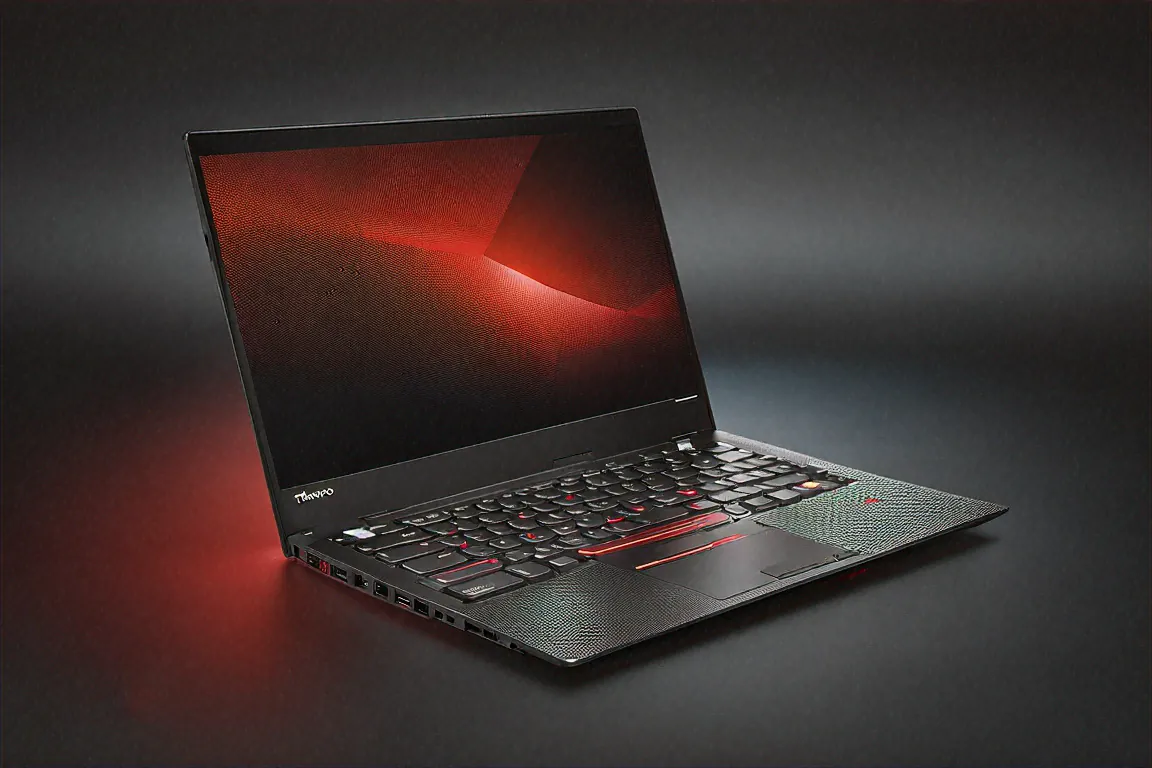
Pulled It Out in a Client Meeting and Nobody Blinked
Mumbai. First week of February. Boardroom at a financial services firm. Seven people around the table, five of them with MacBook Pros. I opened the ThinkPad X1 Carbon Gen 12 and started typing meeting notes. Nobody looked twice. No questions about what laptop I was using. No raised eyebrows. Just another professional tool in a room full of professional tools.
That's exactly what Lenovo designed this for. The ThinkPad X1 Carbon doesn't want attention. It wants to disappear into your workflow — reliable, lightweight, fast, unobtrusive. After ten weeks of using it as my primary machine for consulting work, I'd say it succeeds at that job better than any other laptop I've tested.
The Spec Sheet for the Numbers People
Intel Core Ultra 9 285H with 24 cores and Intel's AI Boost NPU. 32GB LPDDR5X RAM soldered to the mainboard — not upgradeable, so choose carefully. 1TB PCIe Gen 4 SSD. A 14-inch OLED display at 2880x1800, 120Hz, with an anti-glare coating. Optional Privacy Guard screen filter, optional 5G cellular connectivity. All of this in a chassis that weighs 1.12 kilograms.
₹1,59,990. It's not cheap. But I've seen companies issue these as standard equipment to senior employees because the total cost of ownership — durability, service, productivity impact — tends to justify the price over three to five years.
1.12 Kilograms — What That Actually Means for Daily Use
Let me put this in perspective. A litre of water weighs more than this laptop. My water bottle and the X1 Carbon together weigh less than most 15-inch laptops weigh by themselves.
I travel between Delhi and Mumbai roughly twice a month for work. The X1 Carbon in my backpack is effectively weightless. I've genuinely forgotten it's there on multiple occasions and had a moment of panic at the airport thinking I left it somewhere. It's that light. On flights, pulling it out during the meal service when space is tight isn't the awkward juggling act it is with heavier machines. In auto-rickshaws bouncing through traffic, having it on my lap doesn't get tiring.
How does Lenovo achieve this weight? The lid is woven carbon fibre — the same material you see on Formula 1 cars and aerospace components. The bottom cover is magnesium alloy. Both materials offer high rigidity-to-weight ratios, and the result is a laptop that feels impossibly light but doesn't flex or bend when you pick it up by a corner. MIL-SPEC 810H certification means it's been tested against twelve types of environmental stress: extreme temperatures, humidity, vibration, shock, dust. I don't run my own MIL-SPEC tests, obviously, but the confidence that comes from knowing this laptop was designed for rough handling makes a difference when you're shoving it into a crowded bag at a train station.
The ThinkPad Keyboard — Still the Benchmark
I'm going to spend more time on this than most reviewers would because I think it matters enormously for a business laptop. You type on this thing for hours every day. The keyboard experience directly impacts your comfort, speed, and willingness to work at the end of a long day.
The X1 Carbon Gen 12 keyboard has 1.5mm key travel. Sculpted keycaps that cup your fingertips slightly, guiding them to the centre of each key. Precise actuation points with consistent force across the entire keyboard — no mushy edges, no inconsistent spacebar. The tactile bump is clear without being fatiguing.
After ten weeks and probably 300,000+ keystrokes (I write a lot), this is the keyboard I compare everything else to. My MacBook Air M4 review mentioned the Mac keyboard as "second-best." This is what it's second-best to. Writing long client reports, detailed emails, code documentation — all of it flows better on this keyboard than on any laptop I've used in the past five years.
The TrackPoint — that red nub between G, H, and B — still has its fans. I'm one of them. For precise cursor positioning in spreadsheets and documents, it's faster than reaching for the trackpad. Takes a day or two to get comfortable if you've never used one, but then it becomes second nature. The trackpad itself is perfectly fine — glass surface, Windows Precision drivers, responsive multi-finger gestures — but the TrackPoint is uniquely ThinkPad.
Display — OLED With Privacy in Mind
The 14-inch OLED at 2880x1800 with 120Hz refresh is excellent for its size. Colour accuracy hits 100% DCI-P3 out of the box. Text rendering is sharp at the high resolution. The anti-glare coating tames reflections effectively — important for working in offices with overhead fluorescent lights, which is where this laptop will spend most of its time.
What sets this apart from other OLED business laptops is the optional Privacy Guard. Press a keyboard shortcut and the display activates a built-in privacy filter that narrows the viewing angle dramatically. Someone sitting next to you on a flight or in a coffee shop sees a washed-out screen. You see everything normally from your direct viewing position. For anyone working with confidential client data, financial information, or sensitive corporate documents, this feature alone might justify the ThinkPad over alternatives.
Windows Hello facial recognition via the IR camera works reliably — unlocks in under a second, even in dim rooms. Combined with the fingerprint reader on the power button, you have two biometric options for passwordless login. Both work consistently after ten weeks of daily use.
If I'm being critical, the 14-inch screen at this resolution means text is small at native scaling. Windows' 200% scaling is the default and it works well, but you lose some of the screen real estate advantage. At 175% scaling, you get more usable space but smaller UI elements. I settled on 175% and found it comfortable after a day of adjustment.
Performance — Enterprise Workloads Without Drama
My work involves a specific pattern: heavy Chrome usage (30+ tabs, multiple web apps), Microsoft 365 apps running simultaneously, occasional video calls on Teams, Python scripts for data analysis, and VPN connections to client networks. This is a pretty typical enterprise workflow, maybe slightly heavier than average due to the programming component.
The Core Ultra 9 285H handles all of this without visible strain. Applications launch quickly. Switching between multiple desktops with different workloads — one for email and communication, one for data analysis, one for document writing — feels instant. The 32GB of LPDDR5X RAM means I never hit swap even with 40 Chrome tabs and three Office apps running alongside VS Code with multiple files open.
Intel's AI Boost NPU powers Copilot+ PC features that are actually useful in a business context. Live captions during Teams calls work in real-time with decent accuracy — helpful when the audio quality on someone else's end is poor. Real-time translation during multilingual calls is impressive, though accuracy varies by language and accent. Windows Studio Effects provides background blur and lighting correction for the webcam without consuming CPU resources.
Virtual machine performance is adequate. Running a Windows Server 2022 VM inside Hyper-V while maintaining my normal workload worked, though things slowed noticeably with 16GB allocated to the VM. For occasional VM use, it's fine. For all-day VM work, the non-upgradeable 32GB becomes a limitation.
No discrete GPU means no serious creative work or gaming. This laptop doesn't pretend to be something it's not. Integrated Intel Arc handles display output, video decode, and basic graphical UI without issues. That's all it's asked to do here.
Battery Life — Workday Coverage, Sometimes
Here's where I have to be honest about a weakness. The 57Wh battery delivers 8-10 hours of my mixed productivity usage. On lighter days — more reading, less video calls, lower brightness — I've hit 10 hours. On heavier days with back-to-back Teams meetings and screen brightness at 70%, it's closer to 7.
For a 1.12kg laptop, 57Wh is a constraint of physics. There's only so much battery you can fit in a chassis this thin and light. Competing machines at similar weights have similar limitations. But it means you're carrying a charger if your workday regularly exceeds 8 hours, which... most workdays do.
The saving grace: Lenovo's included 65W USB-C charger is compact and light. Rapid charging hits 80% in about an hour. Any USB-C PD charger works, so you can use a 45W or 65W GaN charger as a backup. I keep one at my desk, one in my bag, and never worry about running dry.
5G Connectivity — Actually Useful in India
The optional 5G module accepts a nano-SIM card and provides cellular data connectivity without a phone hotspot. In my use case — working from airport lounges, train stations, client locations with questionable Wi-Fi, and the occasional Uber ride — this feature went from "nice to have" to "genuinely relied on" within two weeks.
Indian 5G coverage in metros is solid now. In Delhi and Mumbai, I consistently got 100-200 Mbps download speeds on Jio. In tier-2 cities, 4G fallback works reliably at 20-50 Mbps. The practical benefit: no more hunting for Wi-Fi passwords, no more tethering my phone and draining its battery, no more "sorry, can you hear me now?" on video calls over hotel Wi-Fi.
Not everyone will use this. If you work primarily from an office or home with stable Wi-Fi, skip the 5G option and save some money. But for frequent travellers and consultants who work from unpredictable locations, it's worth the premium.
Security — Where ThinkPad Differentiates from Consumer Laptops
Fingerprint reader integrated into the power button. IR camera for Windows Hello facial recognition. Optional smart card reader for enterprise environments. Lenovo Privacy Guard on the display. A discrete TPM 2.0 chip. Self-healing BIOS. Hardware dTPM. Kensington lock slot.
Most of these features are invisible to the average user but matter enormously to IT departments. When a company is deploying 500 laptops to employees handling sensitive data, the security stack on the X1 Carbon is why they choose ThinkPad over consumer alternatives that might have better specs on paper.
Full Specifications
| Specification | Details |
|---|---|
| Processor | Intel Core Ultra 9 285H, 24 cores, AI Boost NPU |
| RAM | 32GB LPDDR5X (soldered) |
| Storage | 1TB PCIe Gen 4 SSD |
| Display | 14" OLED, 2880x1800, 120Hz, anti-glare |
| Battery | 57Wh (8-10 hours mixed use) |
| Weight | 1.12 kg |
| Certifications | MIL-SPEC 810H (12 environmental stress tests) |
| Connectivity | Wi-Fi 7, Bluetooth 5.4, optional 5G |
| Ports | 2x Thunderbolt 4, 2x USB-A, HDMI 2.1, 3.5mm |
| Security | Fingerprint, IR camera, Privacy Guard, dTPM 2.0 |
| OS | Windows 11 Pro |
Pros
- 1.12kg is featherweight — lightest 14-inch business laptop available
- MIL-SPEC 810H certified for real-world durability
- Best laptop keyboard in existence, hands down
- Optional 5G cellular provides true untethered connectivity
- OLED display with Privacy Guard for confidential work
- Three years on-site business warranty standard in India
Cons
- 57Wh battery means 8-10 hours max — tight for full workdays
- 32GB RAM soldered with zero upgrade path
- ₹1,59,990 is expensive even for a premium business machine
- No discrete GPU — useless for creative work or gaming
- 14-inch display feels cramped for multi-window workflows
Service and Warranty in India
Three years of on-site business warranty is standard. Lenovo's service infrastructure in India is mature — in most metro and tier-2 cities, a technician comes to your office or home within one to two business days. I've dealt with Lenovo business support for previous ThinkPads and the experience was professional and efficient. Extended warranties and accidental damage protection are available through Lenovo Vantage.
Lenovo Vantage handles firmware updates, battery health monitoring, warranty tracking, and system diagnostics. It's one of the better manufacturer utilities — clean, functional, not pushy. Updates install reliably and I haven't encountered driver issues in ten weeks of use.
Speakers, Webcam, and Microphones
Speaker quality is adequate for a thin business ultrabook. Don't expect room-filling sound — the dual speakers are small and positioned on the bottom, firing downward. Clear enough for video calls and casual podcast listening. For anything more, you'll want headphones or an external speaker. This isn't a media consumption machine and Lenovo clearly didn't prioritize audio.
The 1080p webcam with IR is good for a business laptop. Windows Hello facial recognition works fast and consistently. Video call image quality in well-lit offices is clean and professional. Dim rooms produce more noise but the image stays usable. The dual-array microphones provide clear voice pickup with decent background noise cancellation — I've taken calls from noisy cafes and airport lounges without complaints from the other end.
For frequent video callers, the webcam and mic quality genuinely matters. The X1 Carbon's combination is strong enough that I never felt the need to carry an external webcam for professional calls. Small detail, but it removes one more thing from the bag.
The Competitor I Keep Thinking About
The MacBook Air M4 at ₹1,24,900 weighs 1.24kg — just 120 grams more — and delivers 14-16 hours of battery life with comparable or better single-threaded performance. No fan noise. Better trackpad. Arguably better display, though without the Privacy Guard option.
If I weren't locked into Windows for work — specific enterprise tools that don't have macOS versions, Active Directory integration, certain VPN clients — I'd be seriously tempted. The ThinkPad X1 Carbon wins on keyboard quality, port selection (four ports versus two on the Mac), MIL-SPEC certification, 5G option, and Windows compatibility. But Apple wins on battery life and efficiency so convincingly that it's a genuine factor in the decision.
For people whose IT department mandates Windows, the X1 Carbon is the best you can get. For freelancers and independents who can choose their platform? It's a harder call than Lenovo would like.
The Port Situation — Better Than Most Ultrabooks
Two Thunderbolt 4 ports. Two USB-A 3.2 ports. HDMI 2.1. A 3.5mm combo audio jack. For a business ultrabook, this is generous. Having both Thunderbolt and USB-A means you can plug in legacy peripherals — USB flash drives, mice, presentation clickers — without carrying a dongle. The HDMI port connects to conference room projectors directly, which matters more than you'd think when you're presenting at client offices with ancient AV setups that don't understand USB-C.
I'd have liked an SD card reader, but that's a personal preference — not everyone needs one. The missing Ethernet port is compensated by the 5G option and Wi-Fi 7. For the rare occasions I need wired networking, a small USB-C to Ethernet adapter fits in my laptop sleeve pocket.
After Ten Weeks
The ThinkPad X1 Carbon Gen 12 does everything I need it to do. Weighs nothing. Survives my commute. Types like nothing else. Looks professional in any setting. Connects to 5G when Wi-Fi fails. Protects my screen from prying eyes on flights.
The battery doesn't last as long as I want. The RAM isn't upgradeable. The 14-inch screen sometimes feels small for my multi-window workflow. These are real limitations that I work around rather than not notice.
I keep using it. That's probably the most honest thing I can say.
Every morning I open it, Windows Hello unlocks it before I've finished sitting down, and I'm working within seconds. No waiting for fans to spin up. No wondering if the battery died overnight. Just open and go. For ten weeks straight, it hasn't crashed, hasn't frozen, hasn't given me a single reason to doubt its reliability. In the consulting world, where missing a deadline or fumbling a client presentation has real financial consequences, that reliability isn't a nice-to-have. It's the whole point.
Price in India
The Lenovo ThinkPad X1 Carbon Gen 12 is priced at ₹1,59,990 in India for the Core Ultra 9 / 32GB / 1TB OLED configuration. Available through Lenovo India's website and authorised enterprise resellers. Corporate procurement often gets volume discounts — check with your company's IT department before buying retail. Lenovo's education portal also offers reduced pricing for students and faculty.



Comments (0)
Leave a Comment
No comments yet. Be the first to share your thoughts!