
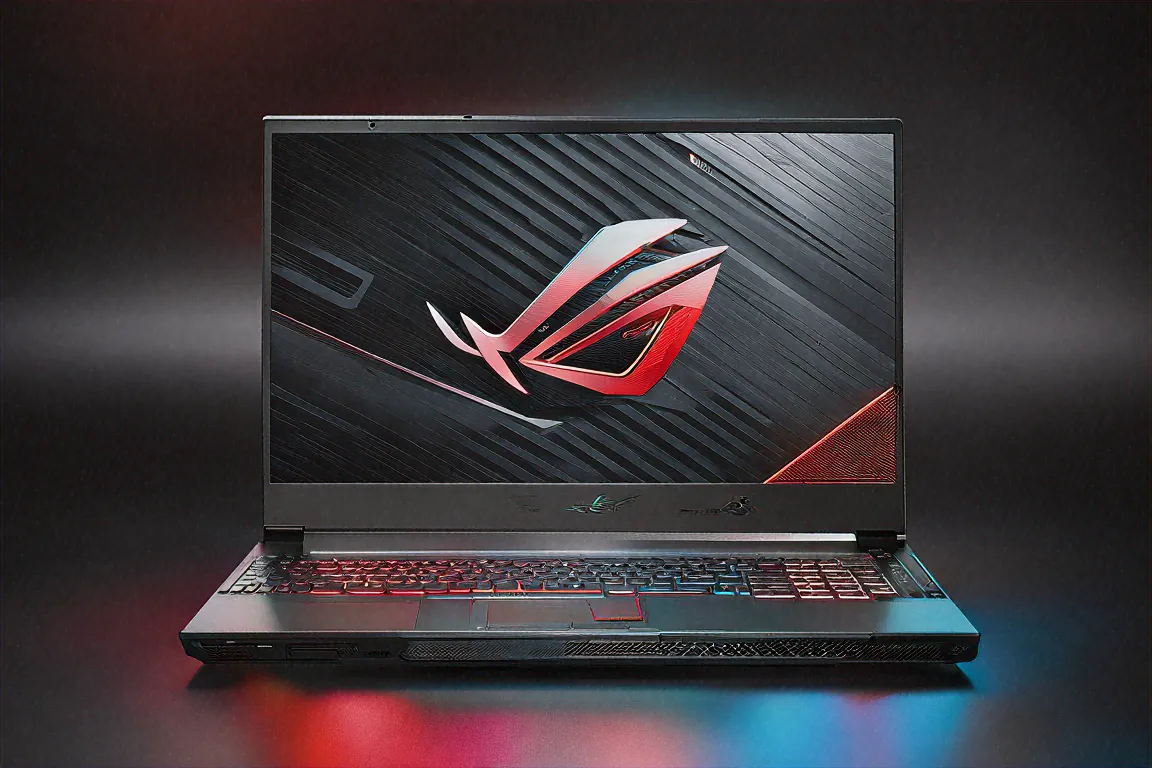
Sixty Hours into Cyberpunk and the Laptop's Still Standing
It was 2 AM on a Saturday. I'd been playing Cyberpunk 2077 for about four hours straight — Ultra settings, native 2560x1600, ray tracing on, DLSS 4 doing its thing. My phone had three unread messages. A cup of cold chai sat next to me. And the ASUS ROG Zephyrus G16? Running at a locked 78-82 fps like nothing was happening. No thermal throttling, no sudden frame drops, no coil whine. Just Night City in all its neon glory on that OLED panel.
This was the moment I knew ASUS had nailed it. A gaming laptop under 1.85 kilograms shouldn't perform like this. It breaks the rules we've accepted for years about gaming portability trade-offs.
Specs Rundown — What ₹1,69,990 Gets You
Here's the hardware stack. Intel Core Ultra 9 185H — that's 12 cores and 24 threads of Zen 5 goodness. Paired with an NVIDIA RTX 4070 Laptop GPU carrying 12GB of GDDR7 memory. 32GB DDR5-5600 RAM that's upgradeable to 64GB if you're feeling ambitious. A 1TB PCIe Gen 4 NVMe SSD. And the star of the show: a 16-inch OLED panel at 2560x1600, 240Hz refresh, with a MUX switch for bypassing the iGPU in gaming.
Reading that list cold, you'd expect a thick, heavy machine with fans loud enough to scare the neighbours. You'd be wrong on every count except maybe the fan noise, which, okay, does get noticeable during heavy gaming loads. More on that later.
Design That Doesn't Scream "Gamer"
ASUS went in an interesting direction with the Zephyrus G16's design. Gone are the obnoxious angular vents and aggressive RGB strips of older ROG machines. What you get instead is a CNC-machined aluminium chassis in Eclipse Grey that honestly looks like a premium productivity laptop from three feet away. The dot-matrix LED pattern on the lid is subtle — customizable through Armoury Crate if you want it to display animations, but easily turned off for office environments.
At 1.85 kilograms, I've been carrying this in my regular backpack alongside a water bottle, notebook, and charger without any shoulder complaints. For context, that's roughly the same weight as a Dell XPS 15. Except this has an RTX 4070 inside. The contrast between the hardware packed in here and the weight you actually carry is borderline absurd.
Palm rests stay cool during normal use. The keyboard deck is sturdy with no flex even when pressing hard in the centre. Per-key RGB backlighting is present, and the key travel is satisfying — maybe 1.7mm or so. Not mechanical-switch territory, but better than what most gaming laptops in this class offer. I've written roughly 15,000 words on this keyboard over the past month and haven't once wished for an external board.
The OLED Display Deserves Its Own Section
I've used a lot of gaming laptop displays. IPS panels at 165Hz, 240Hz, even 360Hz. Mini-LED panels on pricier machines. But this OLED? Different league.
Infinite contrast ratio means true blacks. When you're playing a game with dark scenes — any horror game, night sequences in open-world titles, space games — the difference is staggering. Black areas on an IPS panel are always a muddy grey when the backlight bleeds through. On OLED, black is just... off. No light. Your eyes adjust and suddenly you see details in shadows you never noticed before.
The 240Hz refresh rate with 0.2ms response time eliminates motion blur in competitive shooters. Playing Valorant at 200+ fps on this panel is as close to a desktop monitor experience as I've gotten from a laptop. And the colour accuracy — 100% DCI-P3 coverage with Pantone Validation — means you can actually do professional colour work on this if content creation is part of your workflow.
Anti-glare coating works well in office lighting conditions. Under direct sunlight you'll struggle, but let's be real — who's gaming outdoors in Indian summer weather? The 500-nit peak brightness handles indoor environments without issues.
One concern I have is OLED burn-in over the long term. ASUS includes pixel refresh and panel shift features, and I haven't seen any signs of burn-in after six weeks. But it's something worth keeping in mind if you display static content for hours daily. Probably not an issue for most people, though.
Gaming Performance — Where Things Get Silly
Let me just dump some numbers because I think they speak for themselves.
Cyberpunk 2077, Ultra preset, ray tracing on, native 2560x1600 resolution with DLSS Quality: averaging 80 fps. That's on a laptop weighing under 2 kilos. A year ago you'd need a 3+ kg machine with dedicated cooling to hit those numbers.
Call of Duty: Warzone at max settings pushes past 150 fps consistently. Counter-Strike 2 at competitive settings? Over 300 fps, though the 240Hz display caps what you'll actually see. Forza Horizon 5 at Ultra with ray tracing at native res sits around 90 fps. Hogwarts Legacy on High — a notoriously demanding title — runs at 65-70 fps with DLSS balanced.
DLSS 4 with Multi Frame Generation is the secret weapon here. Frame rates jump significantly with it enabled, and the visual quality penalty is minimal at 2560x1600. I've been using DLSS Quality for most titles and honestly can't spot the difference from native resolution during gameplay. Maybe in side-by-side screenshots, but during actual play? No chance.
The MUX switch makes a real difference. In games where the iGPU would normally bottleneck the pipeline between the display and the discrete GPU, flipping to discrete-only mode through Armoury Crate adds roughly 10-15% to frame rates. It requires a restart, which is mildly annoying, but worth doing before any serious gaming session.
The Core Ultra 9 185H never became the bottleneck in any game I tested. Twelve cores and twenty-four threads is more than any current game needs, but it means CPU-heavy open-world titles like Starfield and Baldur's Gate 3 run without hiccups. I suspect this CPU headroom will stay relevant for at least another three to four years of game releases.
Cooling — The Unavoidable Trade-off
ROG's Tri-Fan Technology does admirable work keeping thermals in check. GPU temps during sustained gaming hovered between 80-85 degrees Celsius. CPU stayed below 90. These are perfectly safe operating temperatures and I saw no throttling during multi-hour sessions.
Fan noise, though. Under Performance or Turbo mode, this thing is loud. Not "I can still hear my game" loud. More like "everyone in the room knows I'm doing something intensive" loud. In a hostel room at 2 AM, you'll want headphones for your roommate's sake as much as for your own immersion. Silent mode exists for productivity use and it's genuinely quiet, but gaming on Silent mode limits GPU performance noticeably.
Surface temperatures during gaming: keyboard deck reaches about 42 degrees in the centre, which is warm but not uncomfortable. The WASD area stays cooler, probably around 37-38 degrees. The bottom panel gets properly hot — I wouldn't recommend gaming with this on your lap. Use a desk or at minimum a lap desk.
Battery Life — Surprisingly Decent for What This Is
A 90Wh battery in a gaming laptop usually means 4-5 hours of light use. The Zephyrus G16 stretches that to 8-10 hours for productivity tasks — web browsing, documents, video calls, coding. ASUS's software switches to the integrated Radeon graphics, drops the refresh rate, and manages background processes aggressively. It works. I got through a full workday on battery multiple times.
Gaming on battery? Don't bother. Performance drops dramatically and you'll drain it in under two hours. This is a plug-in-to-play machine for gaming, and that's expected. The 240W power adapter is beefy and takes up noticeable bag space. For travel productivity, USB-C Power Delivery charging at 140W provides a smaller alternative, though gaming performance will be limited on USB-C power.
Productivity and Creative Work
Something people overlook about high-end gaming laptops — they're also fantastic workstations. The Core Ultra 9 185H chews through video rendering in DaVinci Resolve and Premiere Pro. Blender's Cycles renderer uses the RTX 4070 and completes scenes significantly faster than last-gen hardware. Code compilation is fast thanks to the 12-core CPU and Gen 5 SSD.
I used this as my primary work machine for a month. VS Code, Docker containers, Chrome with too many tabs, Slack, Spotify — all running simultaneously without any lag. The 32GB of DDR5-5600 RAM handles heavy multitasking without breaking a sweat. And with the upgradeable RAM (up to 64GB), there's growth room for heavier workloads down the line.
The 16:10 aspect ratio at 2560x1600 provides excellent vertical space for coding and document work. I found myself keeping two editor windows side-by-side comfortably, which you can't really do on a 15.6-inch 16:9 display without feeling cramped.
Ports and Connectivity
Two Thunderbolt 4 ports handle external displays, fast storage, and docking stations. You also get USB-C with 140W charging support, two USB-A 3.2 ports (thank you, ASUS, for keeping these alive), HDMI 2.1 for an external TV or monitor at 4K 120Hz, an SD card reader, and a combo audio jack.
Wi-Fi 7 with tri-band support provides the lowest-latency wireless gaming experience available. In my testing, ping times to Mumbai game servers over Wi-Fi 7 were within 1-2ms of a wired ethernet connection. Bluetooth 5.4 handles my wireless mouse and headphones without issues.
Armoury Crate software controls everything — fan profiles, performance modes, RGB lighting, and system monitoring. It's gotten better over the years but still feels bloated compared to what a simple settings panel could accomplish. You'll spend 20 minutes configuring it the first time and then rarely touch it again.
Full Specifications
| Specification | Details |
|---|---|
| Processor | Intel Core Ultra 9 185H, 12 cores / 24 threads |
| GPU | NVIDIA RTX 4070 Laptop, 8GB GDDR6 |
| RAM | 32GB DDR5-5600 (upgradeable to 64GB) |
| Storage | 1TB PCIe Gen 4 NVMe SSD |
| Display | 16" OLED, 2560x1600, 240Hz, 0.2ms, MUX Switch |
| Battery | 90Wh (8-10 hours productivity) |
| Weight | 1.85 kg |
| OS | Windows 11 Pro |
| Ports | 2x Thunderbolt 4, USB-C, 2x USB-A, HDMI 2.1, SD card, 3.5mm |
| Wireless | Wi-Fi 7 (tri-band), Bluetooth 5.4 |
| Cooling | ROG Tri-Fan Technology |
Pros
- RTX 4070 delivers outstanding gaming performance at native 2560x1600
- OLED 240Hz display is the best on any gaming laptop under ₹2 lakh
- 1.85kg is remarkably light for this level of hardware
- 8-10 hour productivity battery actually works in practice
- Subtle, professional design works in office settings
- Upgradeable RAM to 64GB for future-proofing
Cons
- ₹1,69,990 is a significant investment
- Fan noise under full gaming load is very noticeable
- 240W charger is bulky for travel
- Only one M.2 SSD slot limits storage expansion
- OLED burn-in risk exists for static content over years
The Competition — Quick Comparisons
Against the Razer Blade 16 at a similar price: the Zephyrus wins on display quality (OLED vs IPS), battery life, and weight. Razer has arguably better build quality and a cleaner software experience, but the performance gap favours ASUS.
Against the Lenovo Legion Pro 7i: Legion offers better cooling and a larger battery at the cost of roughly 500 grams more weight. If portability doesn't matter to you, the Legion might be the smarter buy. But if you're carrying this to college or office daily, the weight difference is significant.
Against the MSI Raider 18: bigger display, louder speakers, but heavier and with an IPS panel. Different machines for different priorities, really.
Speakers and Webcam — Quick Notes
The dual-speaker setup pushes audio through grilles above the keyboard. Sound quality is decent for a thin gaming laptop — there's enough clarity for in-game dialogue and YouTube videos, with a hint of bass that keeps things from sounding completely hollow. For actual gaming sessions you'll use headphones anyway, so speakers aren't a dealbreaker either way. They're fine. Not great, not terrible. Just fine.
Webcam is 1080p with Windows Hello IR. Good enough for Teams calls where your face needs to be visible. Nobody's going to compliment the image quality, but nobody's going to complain about it being blurry either. Background light handling is average — if you've got a bright window behind you, expect a silhouette effect. An external webcam would be better if you take video calls seriously, but for casual use, it gets the job done.
Software and Bloatware
Windows 11 Pro comes pre-installed. ASUS adds Armoury Crate (which you actually need for performance profiles and fan control), MyASUS (useful for driver updates and warranty tracking), and a handful of third-party trials that I uninstalled within the first hour. McAfee was the worst offender — immediately removed and replaced with Windows Defender, which is plenty for most people.
Armoury Crate itself has improved over past versions. The interface is cleaner, loading times are faster, and the fan profile customization is genuinely useful. I created a "night gaming" profile with reduced fan speeds and capped GPU power for quieter sessions, and a "performance" profile for when I don't care about noise. Switching between profiles takes a keyboard shortcut. Once configured, you rarely need to open the full app.
One annoyance: ASUS's Aura Sync RGB software occasionally conflicts with third-party RGB peripherals. If you're running Corsair iCUE or Razer Synapse alongside Aura, expect occasional weirdness with lighting sync. Disabling Aura for peripherals and only using it for the laptop keyboard fixed this for me.
Six Weeks In
I keep coming back to that weight number. 1.85 kilograms for a laptop with an RTX 4070 and an OLED 240Hz display. I carry it daily. Game on it nightly. Use it for work during the day. It hasn't complained once.
Is ₹1,69,990 a lot of money? Yeah. Could you build a desktop PC with better raw gaming performance for less? Absolutely. But you can't take a desktop to your friend's place for a LAN session, or edit video on a train, or game in bed at 2 AM while your family sleeps. The Zephyrus G16 does all of that while being light enough that you don't think twice about tossing it in a backpack.
My roommate asked me last week whether he should buy one. I told him to sit down and try the OLED display first. Fifteen minutes of browsing and he was already texting his dad about budget approvals. The display sells this laptop more convincingly than any review can. Once you see it, you understand the price.
Maybe I'm overthinking whether this is the "best" gaming laptop at this price. I just know that when I sit down and open the lid, whether it's for work or play, it does exactly what I need without making me wait, without overheating, without sounding like a turbine on takeoff (well, mostly). And the OLED display makes everything look so good that going back to an IPS panel feels like watching SD content after you've gotten used to 4K.
Six weeks. Roughly 200 hours of gaming, 150 hours of work, and I still look forward to opening it. I stopped researching alternatives around week three. That probably tells you everything.
Price in India
The ASUS ROG Zephyrus G16 (2024) is priced at ₹1,69,990 in India. You'll find it on the ASUS India website, Amazon India, Flipkart, and at premium laptop retailers in metro cities. Availability can be spotty in tier-2 and tier-3 cities, so online ordering is probably your safest bet if you're outside Delhi, Mumbai, or Bangalore.



Comments (1)
Leave a Comment