
I've been a PC gamer for fifteen years. Built my first rig in college — a Pentium dual-core with an NVIDIA 8400 GS that could barely run Counter-Strike Source at 40fps. Since then I've gone through maybe six or seven builds, gradually climbing the performance ladder. My current desktop has a Ryzen 7 7800X3D and an RTX 4070 Ti. It does everything I want at 1440p. But here's the problem: it sits in my room. Chained to my desk. And increasingly, I'm not at my desk.
Working from home changed things. Sounds counterintuitive, right? You'd think being home all day means more desk time. Nope. Turns out when your office IS your desk, the last thing you want to do after work is sit at that same desk to game. I've been gravitating toward my couch, my bed, the balcony. I wanted my Steam library untethered from that desk setup. That's how I ended up with the ASUS ROG Ally.
Two months in. Here's everything I've learned.
The Hardware at a Glance
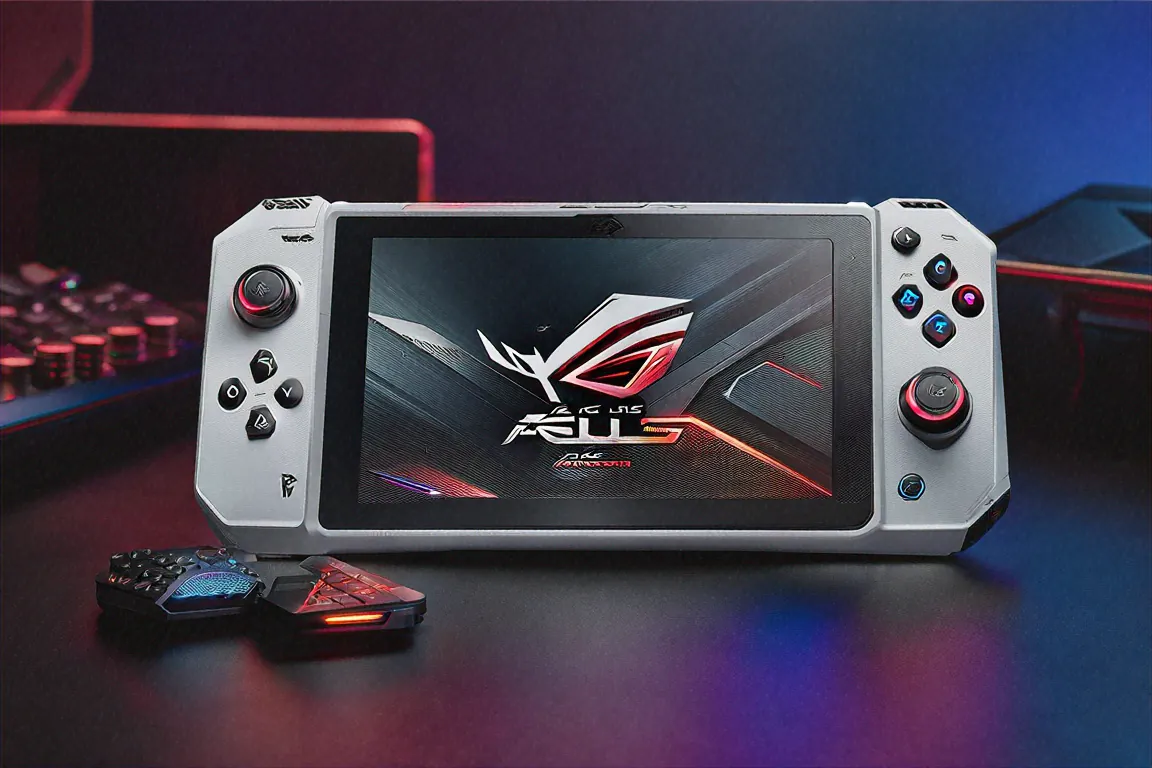
The ROG Ally packs AMD's Ryzen Z1 Extreme processor with RDNA 3 integrated graphics — 12 compute units running at a configurable 15-30W TDP. You get 16GB of LPDDR5-7500 RAM and a 512GB SSD. The screen is a 7-inch IPS panel running at 1920x1080 with a 120Hz refresh rate and VRR support. Battery is 80Wh. Weight comes in at 678 grams. It runs full Windows 11.
That last part — Windows 11 — is simultaneously the ROG Ally's greatest strength and its most persistent annoyance. More on that later.
Build and Ergonomics
ASUS redesigned the grip for this generation, and you can feel the difference immediately if you've held the original Ally. It's more sculpted, more contoured to the natural curl of your fingers. After three-hour sessions my hands don't cramp. Can't say the same about the first Ally, which started hurting after about ninety minutes.
The back has this textured surface — not quite rubber, not quite soft-touch plastic — that gives you a secure hold even when your palms get sweaty during tense gameplay moments. Matte plastic finish with ROG accents across the body looks good without being too "gamer-y." It's understated enough that you won't feel embarrassed using it at a coffee shop or on a flight.
Now, the controls. Hall-effect thumbsticks. If you don't know what that means: they use magnets instead of physical contact to register input, which means they don't develop drift over time. This was a major complaint with the original Ally, which used traditional rubber dome sticks that started drifting for many users within 6-8 months. ASUS listened. Problem solved. The sticks feel precise, with good resistance and travel. Playing shooters on them isn't as accurate as a mouse obviously, but for a handheld it's as good as I've experienced.
The ABXY buttons use a magnetic mechanism too. There's a crispness to each press — a satisfying click with minimal mushiness. Triggers feel responsive. The d-pad is serviceable for fighting games though not spectacular. Overall the control suite feels like ASUS took every piece of hardware criticism from the first Ally and addressed it point by point.
The Display
Seven inches. 1080p. 120Hz. VRR. Let me just say — this is probably the best display I've seen on any gaming handheld, period. Brightness hits around 500 nits which is more than enough for indoor use and even decent outdoors in shade. Gorilla Glass DXC provides scratch resistance, so I haven't bothered with a screen protector.
The 120Hz refresh rate paired with VRR makes a tangible difference compared to 60Hz handhelds. Games that hit 80-90fps look noticeably smoother. Even when framerates dip to 45-50 in demanding scenes, VRR keeps tearing away and the experience stays pleasant. Playing Hades II at 120fps on this thing? Absolute joy. The fluidity is addictive.
Colour accuracy is decent for an IPS panel — I wouldn't edit photos on it professionally, but for gaming the vibrancy is spot on. Blacks aren't as deep as an OLED obviously, but the overall picture quality during gameplay rarely left me wanting more.
Gaming Performance — The Real Question
This is what you're here for. Can the ROG Ally actually play PC games well? Short answer: yes, with caveats. Long answer: it depends entirely on what you play and what settings you're willing to accept.
The RDNA 3 GPU in the Ryzen Z1 Extreme is a significant step up from the original Ally's RDNA 3. In my testing across maybe thirty games over two months, here's what I found.
Indie and AA titles — Hades II, Vampire Survivors, Hollow Knight Silksong, Stardew Valley, Disco Elysium — run flawlessly at 1080p 60fps or higher. No complaints. These games are what the ROG Ally eats for breakfast.
Mid-tier AAA games — Spider-Man Miles Morales, God of War, Horizon Zero Dawn — are very playable at 900p with FSR upscaling. I was getting 45-60fps in most areas of Miles Morales at medium settings with FSR on Performance mode. That's genuinely enjoyable gameplay. Not what you'd get on a PS5, but for a device you're holding in your hands? Impressive.
Heavy AAA titles — Cyberpunk 2077, Starfield, Alan Wake 2 — require more compromise. Cyberpunk at 900p low-medium with FSR on Ultra Performance mode gives maybe 35-45fps. Playable? Technically yes. Enjoyable? Depends on your tolerance. I found myself sticking to lighter games in portable mode and saving the heavy stuff for when I could dock or connect the XG Mobile.
Speaking of which — the ROG XG Mobile compatibility is a big deal if you're willing to invest. Connecting an external RTX 4070 GPU through the XG Mobile dock transforms the ROG Ally into a proper desktop gaming setup. It's not cheap — the dock plus GPU is almost as much as the ROG Ally itself — but if you want one device that does both portable and desktop gaming, this is currently the only handheld that offers that. I don't own one personally, but I tested a friend's setup and yeah, Cyberpunk at 1440p Ultra was running beautifully through the ROG Ally. Pretty wild.
The Windows Problem
I need to be honest about this because it's the single biggest friction point of owning the ROG Ally. Windows 11 was not designed for a 7-inch touchscreen with gamepad controls. Despite ASUS's efforts with the Armoury Crate software — which acts as a game launcher overlay — you will inevitably need to interact with the Windows desktop. Installing games, updating drivers, adjusting settings that Armoury Crate doesn't cover, troubleshooting random Windows stuff.
And doing Windows tasks on a 7-inch touchscreen is painful. The touch targets are tiny. The on-screen keyboard is awkward. Sometimes you need to dig through file explorer or deal with a UAC prompt or dismiss a Windows Update notification, and every time it breaks the "console-like" experience that the Steam Deck's SteamOS provides so well.
Is it a dealbreaker? Not for me — I'm a PC gamer, I'm used to tinkering. But for someone coming from a console background expecting a pick-up-and-play experience? This could be genuinely frustrating. ASUS has improved Armoury Crate a lot since the first Ally, and it covers 80% of daily use. That remaining 20% is where the rough edges show.
On the flip side, Windows compatibility means access to literally every PC game ever made. Steam, Epic, GOG, Xbox Game Pass, Battle.net, EA App. If it runs on a PC, it runs on the ROG Ally. That's a library of tens of thousands of games. No other handheld can match that breadth.
Battery Life — Brace Yourself
Here's the ugly truth. During demanding AAA gaming — Cyberpunk, Starfield, anything pushing the GPU hard — I'm getting about 2 to 2.5 hours from the 80Wh battery. Sometimes less if the TDP is cranked to 30W.
Lighter games are much better. Indie titles, older games, turn-based stuff — 5 to 7 hours is achievable. Playing Persona 5 Royal at 15W TDP with the framerate capped at 30fps, I got a little over 6 hours. That's pretty decent.
The 65W USB-C fast charging helps. I carry a 65W GaN charger wherever I go and it's become a non-negotiable part of the ROG Ally experience. Tops up pretty quickly — maybe an hour from 10% to 90%. But the fact that you need to plan around charging for heavy gaming sessions is a reality you should factor in.
Fan noise is the other thing. Under gaming load the fans spin up noticeably. In a quiet room it's definitely audible. On a crowded train or bus with earphones in? Doesn't matter. But if you're gaming in bed while your partner sleeps? Yeah, they'll hear it.
Software and Features
Armoury Crate gives you TDP management, fan curve profiles, and per-game optimization settings. You can set different wattage levels for different games — maybe 15W for Stardew Valley and 25W for Spider-Man. It saves these profiles automatically. The Command Center overlay (accessed by pressing both bumpers) lets you tweak settings on the fly without exiting your game. Works well, mostly.
Wi-Fi 6E provides solid connectivity. Bluetooth for wireless earbuds. MicroSD expansion for extra storage — though the 512GB SSD is generous enough that I haven't felt the need yet. USB-C connects to external monitors if you want to play on a bigger screen. Cloud gaming through Xbox Game Pass works well over a stable connection, letting you stream demanding titles that the hardware can't run natively.
Full Specifications
| Specification | Details |
|---|---|
| SoC | AMD Ryzen Z1 Extreme with RDNA 3 |
| RAM | 16GB LPDDR5-7500 |
| Storage | 512GB SSD |
| Display | 7-inch IPS, 1920x1080, 120Hz, VRR |
| Battery | 80Wh (2-7 hours depending on use) |
| Charging | 65W USB-C |
| OS | Windows 11 |
| Weight | 678g |
Pros
- Full Windows means access to every PC game — Steam, Epic, GOG, Game Pass, everything
- RDNA 3 GPU is a meaningful jump over the original Ally's performance
- Hall-effect thumbsticks eliminate drift worries entirely
- XG Mobile external GPU option for desktop-class gaming when docked
- 120Hz 120Hz display makes even variable framerates feel smooth
Cons
- 2-2.5 hours of battery during heavy AAA gaming is rough
- At Rs. 64,999 this isn't an impulse purchase for most Indian gamers
- Fan noise gets noticeable when the GPU is pushed hard
- Windows 11 on a 7-inch touchscreen still feels awkward despite Armoury Crate
How It Stacks Up Against Alternatives
The obvious comparison is the Steam Deck OLED. It's cheaper, has a better software experience through SteamOS, and the OLED screen looks gorgeous. But the ROG Ally is significantly more powerful — the RDNA 3 chip outperforms the Steam Deck's custom APU by a meaningful margin. Games that are borderline unplayable on the Deck run fine on the ROG Ally. If raw performance matters to you, the ROG Ally wins.
Against the Lenovo Legion Go S, the ROG Ally has better build quality and better controls. The Legion Go S is lighter and has some interesting features like its detachable controllers, but the ROG Ally feels more refined as an overall package.
The Nintendo Switch 2 isn't really a direct competitor since it runs Nintendo games, not PC games. Different ecosystems, different audiences. If you want Mario and Zelda, get the Switch. If you want your Steam library portable, it's between the ROG Ally and the Deck.
The Indian Context
At Rs. 64,999 this is definitely a premium device by Indian standards. You could build a decent entry-level gaming desktop for that money, or buy a PS5 with a game or two. The ROG Ally makes sense if you specifically value portability and already have a significant Steam library that you've invested in over the years.
For Indian gamers who commute by metro or travel frequently for work, the ROG Ally fits into those dead hours of travel beautifully. I've been gaming on the Bangalore metro daily for the past month and it's turned my commute from a thing I endure into something I kind of look forward to. The ability to just suspend a game, drop the ROG Ally into my bag, and resume exactly where I left off twenty minutes later — that loop is incredibly satisfying.
Heat management in Indian ambient temperatures is worth mentioning. Even in Bangalore's relatively mild climate the device runs warm during heavy gaming. I'd imagine in peak Delhi or Chennai summer with 40-45 degree ambient temps, thermal throttling might become more of an issue. Haven't been able to test this myself yet — something to watch for if you're in a hotter region.
Who This is Actually For
Existing PC gamers who want portability. That's it. That's the core audience. If you already own fifty games on Steam and wish you could play them on the couch, on the train, in bed, on a flight — this is your device. It scratches that specific itch better than anything else available.
It's not for people new to PC gaming. The Windows overhead, the tinkering with settings per game, the driver updates — this stuff assumes a baseline familiarity with PC gaming that casual users won't have. A console or the Nintendo Switch would serve them much better.
It's also not for people who only play competitive multiplayer games. You're not going to be competitive in Valorant or CS2 on thumbsticks against mouse and keyboard players. If that's your primary gaming diet, a laptop or desktop is what you need.
Content creators who stream or record gameplay might find some use here too, actually. The USB-C output to an external monitor combined with Windows means OBS and other capture software run natively. I haven't tested streaming performance extensively, but I did a quick test recording Spider-Man Miles Morales while playing at 720p medium and it captured fine with minimal frame drops. Not a primary use case, but worth knowing about if you dabble in content creation.
Price in India
The ASUS ROG Ally is priced at Rs. 64,999 in India. Available through ASUS India's website, Amazon India, and premium laptop retailers. Some offline stores like Croma and Reliance Digital stock it as well, so you can try before you buy if there's a display unit near you. I'd recommend doing that if possible — the ergonomics are something you really need to feel in person.
Two Months Later
My desktop hasn't been turned off. I still use it for work and for the handful of games that demand a proper GPU at high settings. But the ROG Ally has taken over maybe 60% of my gaming time. Most evenings I'm on the couch with it, playing something from my backlog. Games I'd been meaning to get to for years but never bothered because sitting at a desk after work felt like a chore. Persona 5 Royal. The entire Yakuza series. Disco Elysium for the third time. Outer Wilds. Stuff that's perfect for handheld play.
The battery life is annoying. Windows is occasionally frustrating. The price is hard to justify if you're not already a PC gamer. But for those of us who are — who've spent years accumulating a Steam library and dreaming about playing it all untethered from a desk — the ROG Ally delivers on that promise better than anything else I've


Comments (0)
Leave a Comment
No comments yet. Be the first to share your thoughts!