
6:45 AM, Hands Covered in Atta, and a Small Revelation
There's a specific kind of morning chaos that happens in Indian kitchens. You know the one. The pressure cooker's doing its thing on one burner, chai is threatening to boil over on another, and your hands are deep in dough. My phone was sitting right there on the counter, screen locked, completely useless to me. I needed the palak paneer recipe my wife had bookmarked. Couldn't touch anything.
She walked in, didn't even look at me, and just said "Hey Google, show me palak paneer recipe" to the white thing sitting next to the microwave. Screen lit up. Steps appeared. She poured her chai and left. That was three months ago. Haven't unlocked my phone in the kitchen since. Not once.
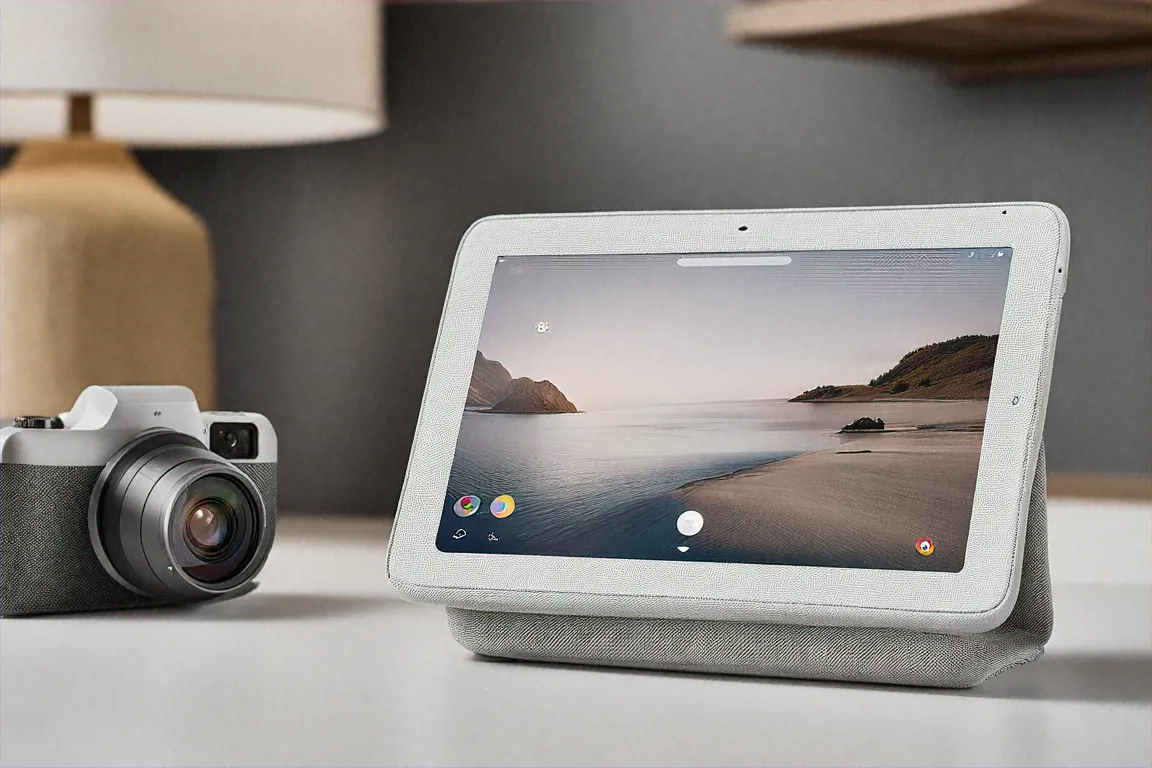
I'm going to tell you something I never thought I'd say. I was wrong about smart displays. Dead wrong. For years I dismissed them as overpriced tablet-speaker hybrids that nobody actually needs. And then the Google Nest Hub 2nd Gen sat on my kitchen counter in Noida for twelve weeks, and slowly, annoyingly, it proved me wrong on almost every count. Almost. There are still problems, and I'll get to those. But first, let me walk you through what living with this Rs 24,999 screen-with-a-fabric-back actually looks like.
What's in the Box and Getting Started
Heavy. That's the first thing you notice when you pick up the package. Not laptop-heavy, but there's clearly real speaker hardware inside. Google keeps things minimal here — you get the display unit with its angled base, a power cable, and a quick start guide. No wall mount bracket. No stand accessories. Nothing fancy. Find a flat surface, plug it in, and you're off.
I went with the chalk colour because my kitchen has light granite countertops. Didn't want the thing sticking out like some sci-fi prop next to the mixer grinder. Turns out that was a great call. The fabric texture covering the back and base gives it this soft, almost furniture-like quality. My mother-in-law was over last week and she didn't even notice it sitting there until Google Assistant responded to something. That's how well it blends in.
Setup took about ten minutes through the Google Home app. Connected it to my Jio Fiber Wi-Fi, signed into my Google account, and it automatically pulled in my calendar events, photo albums, and the handful of smart home devices I already had configured. Pretty painless, honestly. One thing worth mentioning though — you really do need stable internet. My connection drops sometimes during heavy monsoon rain, and during those windows the Nest Hub becomes nothing more than an expensive digital clock showing the wrong time.
The 10-Inch Screen: Not Flagship, But It Works
Let's talk about the display. Ten inches. 1280x800 resolution on an IPS panel. On paper, that sounds mediocre. And in 2026, when even Rs 10,000 phones are shipping with 1024x600 screens, it kind of is mediocre on paper. But here's the thing that surprised me — context changes everything.
You're not holding this thing six inches from your face like a phone. It sits on your counter, maybe a metre or two away while you're chopping onions or washing dishes. At that distance? The resolution is perfectly acceptable. Recipes are readable across the kitchen. YouTube cooking videos play clearly. Video call faces look sharp enough that you can read expressions. I'm not going to pretend it's gorgeous or anything, but it does the job without making you squint.
Put your nose right up against it and sure, you'll see pixels. That's fair criticism. But I think the people complaining about resolution in reviews might be testing it like a tablet rather than using it like a kitchen display. Different use case, different standards.
What genuinely impressed me is Google's Ambient EQ technology. The screen adjusts its white balance to match the room lighting, and it's not a gimmick. Late at night with warm yellow lights on, the display takes on this warm, muted tone that doesn't blast your retinas. During the day with sunlight coming through the window, it shifts cooler and brighter. Subtle change. Makes a massive difference when the thing's sitting in your peripheral vision all day long.
My one complaint about the screen? Viewing angles to the side. There's a slight tilt adjustment built into the base, but it's minimal. Walk around your kitchen and you'll find angles where the screen washes out. Not a dealbreaker by any stretch, but it's there.
30 Watts of Sound That Made Me Put Down My Knife
Okay so this is where the Nest Hub 2nd Gen genuinely shocked me. I wasn't expecting much from the audio. It's a smart display. Speaker quality is usually an afterthought. Thirty watts of stereo sound, Google claimed. Sure, I thought. Marketing numbers.
Then I played an Arijit Singh track through JioSaavn.
I stopped chopping vegetables. Actual bass. Real, room-filling bass from this thing sitting next to my toaster. Not audiophile-grade, I want to be clear about that. It won't replace a proper bookshelf speaker system or even a decent soundbar. But for a kitchen? For background music during a dinner party? For morning podcast listening while getting ready? It fills the space. Comfortably, confidently fills it.
YouTube Music, Spotify, JioSaavn — all work well through it. The stereo separation is noticeable when you're positioned directly in front. Move to the sides of the room and it collapses into something more mono-sounding, which is expected for a device this size. Still sounds good though.
I had an Amazon Echo Show 10 in the house at the same time for about a week, and the comparison was honestly not even close. The Nest Hub 2nd Gen sounds fuller, richer, with better midrange clarity. The Echo Show 10 felt thinner, like it was working harder with less. I wasn't expecting such a clear gap between them.
I've since used this as a makeshift speaker for my kid's online classes when his laptop speaker died. Worked surprisingly well for that too. The human voice reproduction is clean and clear even at lower volumes, which matters more than thumping bass when someone's trying to learn fractions.
Hindi and English Together — The Feature Nobody Talks About
This is the section I care about most, and it's the one that most international reviews skip entirely. In my household — and I think this is true for millions of Indian families — language isn't a single setting. It's a spectrum that changes person to person, sentence to sentence.
My father speaks to it exclusively in Hindi. "Hey Google, aaj mausam kaisa hai?" Works perfectly. My daughter asks it math problems in English. My wife sets cooking timers in Hindi while simultaneously asking it to play English songs. I bark commands at it in English while trying to figure out why the dal is burning.
The Google Assistant handles all of this. Seamlessly switching between Hindi and English without anyone having to toggle a language mode or speak slowly. And because of the Tensor G2 processor handling speech recognition on-device now, responses come back noticeably faster than the older Nest Hub models. I'd say roughly half a second quicker. Doesn't sound like a big deal, but when you're firing off three commands in a row while juggling hot pans, that half second adds up fast.
Face recognition is another feature worth discussing. The no camera identifies who's standing in front of it and personalizes what's on screen. I walk into the kitchen, it shows my calendar and morning commute time. Wife walks in, it shows her reminders and the kids' school schedule. Took about a week of training before it got reliable, and even now I'd say it's accurate maybe 85-90% of the time. Not perfect. But useful enough that I notice when it messes up, which I think says something about how quickly you start depending on it.
Running a Semi-Smart Home From the Kitchen Counter
I should clarify something. My home isn't some fully automated smart home fantasy. I've got some Philips Hue bulbs in the living room, a couple of TP-Link smart plugs, a Sensibo AC controller, and a Ring doorbell. That's it. Pretty typical urban Indian setup — we tend to go heavy on smart switches and AC controllers rather than the Nest thermostats and smart blinds you see in American tech reviews.
The Nest Hub 2nd Gen connects to all of these and shows them on a dashboard you can pull up by swiping from the right edge. It's a nice visual interface for the kind of person who doesn't want to fumble through three different apps on their phone.
Matter and Thread support is baked in. I won't pretend to understand the technical details of Thread mesh networking — something about low-power local connections that don't rely on Wi-Fi for every command. What I can tell you from actual experience is that my Hue lights respond almost instantly when controlled from the Nest Hub now. There used to be a noticeable lag going through the Hue bridge alone. That lag is gone.
The routines feature is where all of this stops being a cool toy and starts being actually useful. I've set up a "Good Morning" routine: kitchen lights come on at 70% brightness, news briefing starts playing, weather appears on screen. A "Good Night" routine dims everything, locks the smart lock, shows tomorrow's calendar. Each routine took about five minutes to configure through the Google Home app. Not hard at all, though the app does have this annoying habit of burying settings in weird submenus that take some digging to find.
I've been controlling the Sensibo AC unit entirely through voice commands for the past two months. Setting different temperatures for different times of day through routines has probably saved me some money on electricity. Haven't done the exact math, but the AC isn't running at full blast all night anymore, so it's something.
The Built-In Camera: Part Security, Part Paranoia Relief
There's a Nest Cam built directly into the display. It'll do 24/7 continuous recording if you subscribe to Nest Aware at Rs 130 per month for the basic plan. I use it primarily as a kitchen camera when we're traveling, mostly to check whether we left the gas stove on. Yes, I know that's an extremely Indian anxiety. And yes, this camera has saved me from making my wife turn the car around at least twice.
Image quality is decent. 6.5 megapixels. Clear enough to see what's happening in the room, not clear enough for any kind of serious security monitoring. Night vision works but gets grainy. The auto-framing during Google Meet no video calls is quite good though — it tracks you as you move around without needing manual adjustment. Handy for those calls where you're trying to talk while checking on something on the stove.
Privacy controls here actually impressed me. There's a physical switch on the top of the device that mechanically disconnects both the camera and the microphone. This isn't a software toggle. It's an actual sliding cover over the camera lens and a hardware disconnect for the mic. When guests come over, I flip it shut. It's a small thing, but having that physical control matters psychologically. You know it's off because you can see it's off.
Three Months of Daily Life
Reviews written after a week don't capture the real story with a device like this. It's the habits that form over weeks two through twelve that tell you whether something's genuinely useful or just novel. Here's what a typical day looks like now.
Morning starts with the sunrise alarm — the screen gradually brightens to simulate dawn, which is genuinely nicer than a blaring phone alarm. I ask for weather and news while brushing teeth. Come to the kitchen and my schedule's already on screen. Mid-day, wife takes over for recipe videos and cooking timers. Multiple timers work independently, by the way. "Set a rice timer for 12 minutes" and "set a dal timer for 20 minutes" run simultaneously with different alerts. Very useful.
Evenings, the kids watch YouTube on it while I'm making dinner. The screen's not big enough for serious viewing, but it's fine for keeping them occupied at the kitchen table. After they're in bed, it becomes an ambient photo frame cycling through our Google Photos albums. It's oddly comforting, seeing old vacation photos pop up while cleaning the kitchen.
Chromecast built-in means I can throw things from my phone to the display. I use this more than expected — cricket highlights while doing dishes, a podcast while cleaning up. Quick, convenient, no pairing hassle.
One annoyance that's persisted through all three months: the Google ecosystem lock-in. Everything needs a Google account. If your family is deep in the Apple ecosystem, this device makes zero sense for you. And if you've got privacy concerns about Google having access to your home cameras and voice data, I respect that — this probably isn't your product either. I've accepted the trade-off personally, but I get why someone wouldn't.
Specs at a Glance
| Specification | Details |
|---|---|
| Display | 7-inch IPS, 1280x800 resolution |
| Processor | Google Tensor G2 |
| Camera | 6.5MP with face recognition |
| Audio | 30W full-range speaker |
| Smart Home | Matter, Thread, Google Home hub |
| Connectivity | Wi-Fi, Bluetooth, Chromecast built-in |
| OS | Google Home OS |
| Privacy | Physical camera/mic disconnect switch |
The Stuff That Still Bugs Me
No product gets a free pass, and the Nest Hub 2nd Gen has real issues worth talking about. The resolution thing. 1280x800 in 2026 is hard to defend, even for a countertop display. Google could've done better here and chose not to. Maybe to keep costs down, maybe for battery reasons on the processor side — I don't know. But it's noticeable.
Netflix doesn't work on it. Still. Whatever ongoing business dispute Google and Netflix have, the result is that one of the most popular streaming services in India is just... absent. You can cast Netflix from your phone, but come on. That's a workaround, not a feature. In a country where every other household has a Netflix subscription, this is a baffling omission.
When the Wi-Fi drops, the device becomes a very expensive photo frame that can't even show photos because it needs the internet for those too. Thread-based devices still respond locally, but most of my smart home gear runs over Wi-Fi. Music stops. Weather disappears. You'd think some basic offline functionality would exist, but it really doesn't.
And the price. Rs 24,999 is a lot. My brother bought an Echo Show 8 for Rs 8,999 and it honestly handles about 70% of what the Max 2 does. The extra sixteen thousand rupees gets you superior audio, a bigger screen, the built-in Nest Cam, and Matter/Thread support. Whether those extras justify nearly triple the price depends entirely on how invested you already are in the smart home thing.
Pros
- Best audio on any smart display — 30W stereo fills a room
- Built-in Nest Cam with 24/7 recording and physical privacy switch
- Matter and Thread hub future-proofs your smart home
- Face recognition delivers personalized content per family member
- Hindi and English voice commands work reliably for the whole family
- Ambient EQ display adapts to room lighting naturally
Cons
- Rs 24,999 is steep when Echo Show 8 handles basics at a third of the price
- 1280x800 resolution feels low for 2026
- Requires stable Wi-Fi — nearly useless during internet outages
- Google account mandatory, which raises privacy concerns for some
- No Netflix app — casting is the only workaround
Who Actually Benefits From Buying This?
After twelve weeks of daily use, here's my honest take on who should and shouldn't spend money on the Nest Hub 2nd Gen.
If you've already got a few smart home devices running through Google Home — buy it. The central hub experience, the Matter/Thread support, the routines that tie everything together — it genuinely improves daily life in small but accumulating ways. If your household naturally switches between Hindi and English, the bilingual Assistant performance alone might justify it. Families where multiple members will interact with it get outsized value from the face recognition and personalized screens.
Kitchen-heavy households where someone's always cooking, always running timers, always wanting background music or recipe guidance — this is basically built for you. The audio quality means you don't need a separate kitchen speaker. The display means you don't need to prop your phone up against a spice jar to watch a cooking video.
But if you're just curious about smart displays and haven't really used one before? I'd say start with the Nest Hub 2nd Gen at Rs 7,999. It's a quarter of the price. See if you actually use the voice commands. See if the timers and routines become part of your day. If they do — if you find yourself wanting more screen, better audio, a camera — then upgrade to the Max 2. Going straight to the top without knowing if you'll even use the category is an expensive experiment.
For single people or couples without much smart home gear, the value proposition gets thinner. You don't need face recognition for one or two faces. You probably don't need 30W of kitchen audio. The Echo Show 8 would serve you perfectly well at a fraction of the cost.
Me personally? The morning routine alone was worth it. Alarm, news, weather, calendar, music, timers — all without touching a screen while my hands are occupied. My wife, who told me it was a waste of money when I ordered it, now talks to it more than she talks to me in the morning. I'm not entirely sure whether that's a recommendation for the product or a commentary on my conversational skills. Either way, it's earned its spot on the kitchen counter. It's not going anywhere.
Price in India
The Google Nest Hub 2nd Gen is priced at Rs 24,999 in India. Available on Flipkart and the Google Store India. During sale events, I've seen it drop to around Rs 21,999, and I'd honestly recommend waiting for one of those if you're not in a rush. That two or three thousand rupees saved makes the value equation a lot easier to accept.



Comments (0)
Leave a Comment
No comments yet. Be the first to share your thoughts!