
My wrists were killing me. Not in a dramatic, carpal-tunnel-diagnosis kind of way, but that persistent, dull ache you get when you've been typing for eight hours a day on a keyboard that's just... fine. Not bad. Not good. Just fine. I'd been using the standard Apple Magic Keyboard — the flat, low-profile one with Lightning — for about three years. It did the job. But over the past year, as my workload shifted from mostly meetings and emails to actual sustained writing and coding, "doing the job" wasn't enough anymore. The shallow key travel was making me bottom out on every keystroke. My fingers were slamming into aluminium twelve hours a day. Something had to change.
I looked at mechanical keyboards. Seriously considered the Keychron Q1 Max and the NuPhy Air96. Both are excellent. But I work across three Apple devices — a MacBook Air M3 on my desk, an iPad Pro for notes during meetings, and my iPhone for quick replies. Switching between Bluetooth keyboards on different devices is a special kind of hell. Disconnect from one, pair with another, wait for it to connect, pray it doesn't pair with the wrong device. I needed something that could switch between all three instantly.
Apple's new Magic Keyboard with Touch ID promised exactly that. Three months and approximately 400,000 words later, here's what I think.
What Makes This "Pro"
The Magic Keyboard with Touch ID adds a bunch of features that the standard Magic Keyboard has been missing for years. Multi-device Bluetooth pairing for up to three devices simultaneously — Mac, iPad, iPhone — with dedicated switching keys. A full 14-key function row with proper media controls and brightness keys. USB-C replacing Lightning, with data passthrough so you can connect peripherals through the keyboard. Improved key travel with an updated scissor mechanism at 1.2mm — the most of any Magic Keyboard ever. Adjustable backlight with 16 brightness levels. Touch ID for fingerprint authentication.
Pretty much everything Apple keyboard power users have been asking for since... well, since the original Magic Keyboard came out.
Design and Build
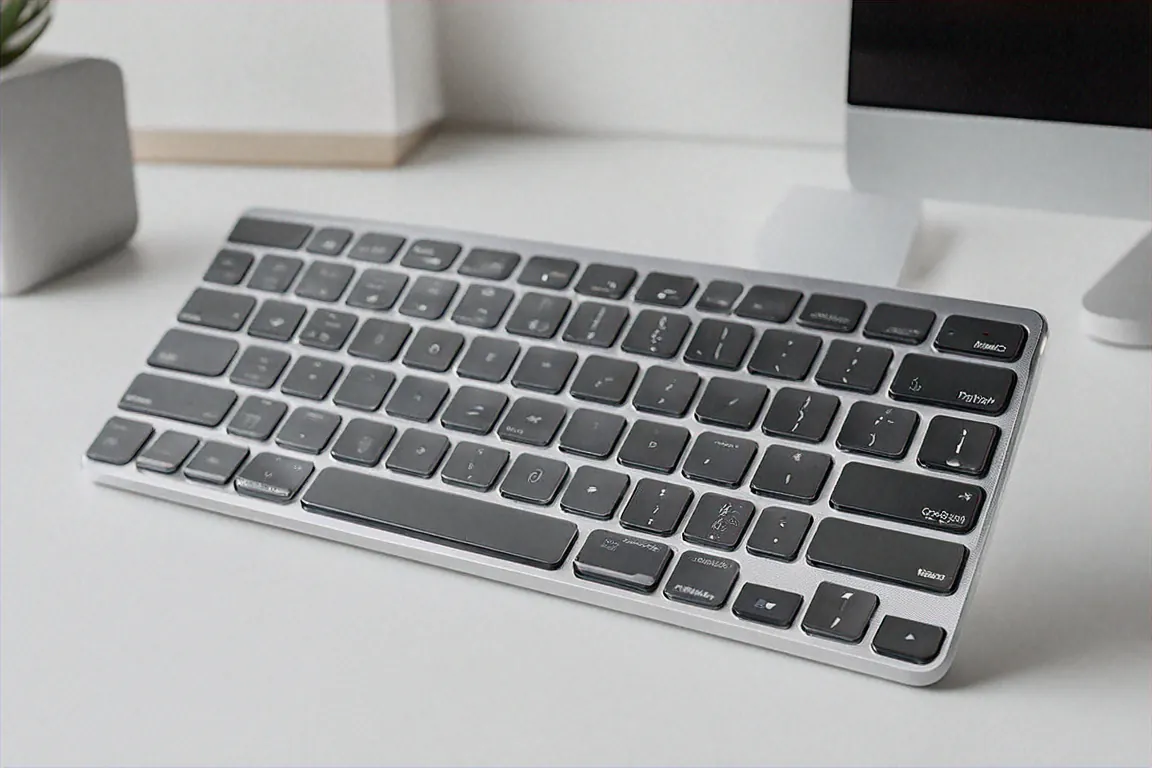
Apple hasn't reinvented anything here visually. Same minimalist aluminium slab aesthetic. Same clean lines. Same restrained elegance that either appeals to you or doesn't. If you've seen a Magic Keyboard, you know what this looks like — just taller because of the dedicated function row.
The keyboard is 25mm taller than the standard Magic Keyboard. Sounds small. Looks noticeable when they're side by side. That extra height accommodates the full function row at the top, which is something the standard model has always been missing. For anyone who's ever stared at the function strip on a standard Magic Keyboard and wondered why Apple couldn't just give us normal-sized function keys — well, they finally did.
Aluminium top plate. Cool to the touch. Feels premium in a way that no plastic keyboard matches. Available in Silver and Space Grey — I got the Space Grey to match my MacBook and it looks great on my desk. At 430 grams it has a pleasant heft. Not heavy enough to be annoying if you move it around, but heavy enough that it doesn't slide across your desk when you're typing aggressively. The rubber feet on the bottom grip well on both wood and glass desk surfaces.
There's a slight incline built into the design — maybe 3-4 degrees of tilt. No adjustable feet or kickstand to change the angle, which is a minor annoyance. I'd have preferred at least two tilt options. Some people like a steeper angle, some like it flat. Apple decided for you. It's comfortable enough for most wrists in the default position, but if you need a specific ergonomic angle, you might want a separate wrist rest or keyboard stand.
The Typing Experience
This is the section that matters for writers and programmers. And I have strong opinions here because I type for a living.
The updated scissor mechanism provides 1.2mm of key travel. For context, the standard Magic Keyboard has about 1mm, and most mechanical keyboards have 3-4mm. So 1.2mm is still a low-profile typing experience — you're not going to mistake this for a mechanical board. But that extra 0.2mm makes more difference than the number suggests. Each keystroke has more travel before bottoming out. There's a slightly more cushioned landing. The tactile feedback is crisper — you feel a distinct "event" with each keypress instead of just... hitting a flat surface.
After three months of daily use, my wrist fatigue has genuinely improved. Not disappeared — I still take breaks every hour or so — but that persistent dull ache I mentioned? Mostly gone. I think it's the combination of slightly more travel absorbing impact and the fact that I'm not bottoming out as hard on every keystroke. Could be placebo. Don't think it is, but I'll acknowledge the possibility.
Key stability is excellent. Each keycap barely wobbles. If you type fast — I average around 85-90 WPM during sustained writing — there's minimal lateral movement on the keys, which means fewer accidental adjacent key presses. For coding, where a misplaced semicolon or bracket can send you on a ten-minute debugging expedition, this matters.
Typing sound is muted and pleasant. Not silent — there's a soft thock with each press — but quiet enough for open offices, video calls, and late-night writing sessions while your partner sleeps. I've done Zoom calls while typing notes and nobody's ever mentioned hearing the keyboard. Can't say the same about my Keychron test unit, which sounded like a typewriter on the call audio.
For Indian users writing in regional scripts via phonetic input — I regularly type in Hindi using the built-in transliteration feature on macOS — the key stability reduces those frustrating moments where you hit two keys at once and get gibberish output. It's a subtle thing, but over the course of a long Hindi typing session, fewer corrections add up to meaningful time savings.
Multi-Device Pairing — The Killer Feature
This is why I bought this keyboard. Full stop. Three devices paired simultaneously, switching between them with fn+1, fn+2, fn+3.
Let me describe my typical workflow. I'm writing on my MacBook Air. A Slack notification appears on my iPad. I press fn+2 — half a second later the keyboard is connected to the iPad. I type a quick response. fn+1 — back to the MacBook. Later in the evening, someone sends a long WhatsApp message on my iPhone that needs a thoughtful reply. fn+3. Type the reply on a proper keyboard instead of thumbing it out on glass. fn+1. Back to work.
The switching takes about 0.5-1 seconds in my experience. Not instantaneous, but fast enough that it doesn't break flow. Occasionally — maybe once every week or two — a switch takes longer, like 2-3 seconds. I suspect that's a Bluetooth reconnection thing rather than a keyboard issue. It's never failed to switch entirely, which is more than I can say about third-party multi-device keyboards I've used in the past.
This feature alone eliminated a USB switch I had on my desk and a secondary keyboard I kept for the iPad. My desk went from two keyboards and a switch to one keyboard. The clutter reduction is tangible. Less stuff on the desk means more space, which means a better working environment. Sounds trivial. It's not, when you spend 10-12 hours at that desk every day.
USB-C and Data Passthrough
Finally, Lightning is dead. The Magic Keyboard with Touch ID uses USB-C for both charging and wired connection. But there's a twist — Apple added data passthrough through the Lightning port. That means you can plug a USB hub or storage device into the keyboard's Lightning port, connect the keyboard to your Mac via cable, and access that peripheral through the keyboard connection.
In practice, I've used this to connect a USB card reader through the keyboard when transferring photos from my camera's SD card. Works perfectly. One less cable running to the back of my MacBook. It's not a feature I use daily, but when I need it, it's clever and convenient.
The Lightning port also means wired mode for zero-latency input. For the programmers reading this — if you've ever noticed the tiniest input lag on Bluetooth during fast typing, wired mode eliminates it completely. Honestly, the Bluetooth 5.3 latency is already low enough that I can't perceive it during normal use, but it's nice to have the wired option for those who want absolute certainty.
Touch ID
The fingerprint sensor in the top-right corner. Works exactly like Touch ID on a MacBook. Unlock your Mac. Authenticate Apple Pay purchases. Autofill passwords in Safari. Confirm system settings changes. It reads my fingerprint accurately about 95% of the time — occasional misses when my fingers are very dry or I place them at an odd angle, but that's true of every Touch ID sensor I've used.
If you use a Mac mini or Mac Studio (desktop Macs without built-in Touch ID), this keyboard is basically the only way to get biometric authentication without buying a separate Touch ID dongle. That alone could justify the purchase for desktop Mac users who are tired of typing their password fifty times a day.
Backlight
Sixteen brightness levels, adjustable manually or automatically via ambient light sensor. The even illumination across all keys is impressive — no bright spots in the center and dim edges like some backlit keyboards. Every key legend is uniformly lit. At night in a dark room at medium brightness, the keys are perfectly visible without being blindingly bright. During the day with good ambient light, the backlight automatically dims or turns off to save battery.
The ambient light sensor is something I didn't expect to appreciate as much as I do. Walk into a dim room, sit down, start typing — the backlight is already at the right level. Move to a well-lit area — it dims automatically. One less thing to think about. Small thing. Appreciated daily.
Battery Life
Apple rates it at approximately 12 months on a single charge. I can't verify that claim after three months of use, but I can tell you this — I haven't charged it once since unboxing. The battery indicator on macOS still shows "High." That's three months of daily use, 8-12 hours per day, backlight on auto, Bluetooth active the entire time. If I actually get a year out of a single charge, that's remarkable. Even if it's "only" 6-8 months, that's still far better than any rechargeable keyboard I've owned.
The included USB-C cable charges it. You can use it while charging in wired mode, so even if the battery does die, you're never without a keyboard.
Specifications
| Specification | Details |
|---|---|
| Layout | Full-size with 14-key function row |
| Pairing | Bluetooth 5.3, multi-device (3 simultaneous) |
| Connection | USB-C with data passthrough |
| Touch ID | Yes — fingerprint authentication |
| Backlight | 16 levels, adjustable with ambient sensor |
| Battery | ~12 months |
| Weight | 430g |
| Compatibility | Mac, iPad, iPhone |
Pros
- Multi-device pairing for 3 devices with near-instant switching
- USB-C with data passthrough — finally no more Lightning
- Touch ID for biometric login on desktop Macs
- Best typing feel of any Magic Keyboard generation — 1.2mm travel makes a real difference
- Battery life measured in months, not days or weeks
Cons
- Rs. 34,900 for a keyboard is objectively expensive — there's no way around that
- No numeric keypad option available at launch
- Apple ecosystem only — won't work with Windows or Android devices
- No Lightning charging for the keyboard itself
The Elephant in the Room: That Price
Rs. 34,900. For a keyboard. I get it. I had the same reaction when Apple announced the price. You can buy a decent laptop for that money. Two mid-range phones. A really nice mechanical keyboard AND a good mouse AND a monitor arm, with change left over for dinner.
But here's how I think about it. I type for probably 8-10 hours every working day. Over a year that's roughly 2,500-3,000 hours. Over the likely 3-5 year lifespan of this keyboard, that's 7,500-15,000 hours of use. At Rs. 34,900, that works out to about Rs. 2.3-4.6 per hour of use. That's... actually not bad when you frame it that way. Less than a cup of chai per hour for a tool that directly impacts your comfort and productivity for years.
If typing is incidental to your work — you send a few emails, browse the web, do some spreadsheet stuff — this keyboard is overkill. Save your money. The standard Magic Keyboard at Rs. 10,900 is perfectly fine for that. The Pro targets people who type as a primary activity: writers, journalists, programmers, content creators, customer support professionals. People whose keyboard is their primary tool, the way a chef's knife is their primary tool. You don't cheap out on the thing you use ten hours a day.
Who Shouldn't Buy This
Windows users. It simply doesn't work with Windows or Android. Apple ecosystem lock-in is absolute here. If you've got even one non-Apple device in your workflow, the Bluetooth pairing becomes less useful.
Mechanical keyboard enthusiasts who want deep travel, hot-swappable switches, and heavy customization. The Magic Keyboard with Touch ID is refined but it's not a mechanical keyboard and doesn't try to be. If you prefer 3-4mm of travel and the tactile satisfaction of scissor-switch switches, this won't convert you.
People who need a numeric keypad. There's no numpad version of the Magic Keyboard with Touch ID at launch. If you work with spreadsheets or accounting software and rely on a numpad, this keyboard has a gap in its layout that you'll notice every single day. Presumably Apple will release a numpad version eventually, but right now it doesn't exist.
Price in India
The Apple Magic Keyboard with Touch ID and Numeric Keypad is priced at Rs. 34,900 in India. Available on Apple India's website, through the Apple Store app, on Amazon India, and at authorised resellers like Imagine and iStore. Apple's student pricing might shave a few thousand off — worth checking if you're eligible.
What It Changed About My Day
Three months in. Here's the honest impact on my daily routine.
My typing speed hasn't changed — still hovering around 85-90 WPM. Wasn't expecting a keyboard to make me type faster, and it didn't. What changed is how I feel after typing. That end-of-day wrist fatigue that had become my constant companion? Reduced significantly. Not eliminated, but reduced enough that I notice the difference. I'm more willing to sit down and write in the evenings now, which I'd been avoiding because my wrists were already sore from the day's work. My average daily word count has gone up by probably 15-20% — not because I type faster, but because I type longer without discomfort.
The multi-device switching has subtly changed how I use my iPad. It used to sit in a drawer most days because typing on the on-screen keyboard was annoying enough to discourage me from using it. Now it lives on my desk and I switch to it multiple times a day — for notes, for quick tasks, for reading articles while my MacBook handles a long compile or render. My iPad usage has probably tripled.
The desk declutter from removing a secondary keyboard and USB switch improved my workspace aesthetics and my general feeling of organization. Sounds silly. Made a real difference in my daily mood. A tidy desk with one beautiful keyboard on it just feels better than a cluttered one with cables going everywhere.
Is all of this worth Rs. 34,900? For me — someone who writes and codes for a living, who works exclusively in Apple's ecosystem, who types 8-12 hours daily — yes. Unambiguously yes. The improvement in daily comfort and workflow efficiency has already paid for itself in terms of productive hours gained and wrist pain avoided. For someone with different needs, different usage patterns, a different budget — your mileage will absolutely vary. But I haven't regretted this purchase for a single day since I made it.




Comments (0)
Leave a Comment
No comments yet. Be the first to share your thoughts!